Mind xPlay – Multiple issues when paired via Mind Link (battery life, status indicator, buzzing noise)

Which system do you use? Windows

Which version of system do you use? Windows 11 Home 24H2, OS Build 26100.7840

Please describe your issue below:

Hi,

I’m using a Khadas Mind (i7-1360P) with a Mind xPlay via Mind Link. I’ve encountered the following issues and would appreciate your help.

1. Short battery life

The xPlay battery ran out in approximately 1.5 hours under the following conditions: Mind (i7-1360P) connected via Mind Link, Chrome running YouTube 1080p streaming, no other applications open except Mind App running in the background, and brightness set to minimum using the F1 key on the xPlay Keyboard.

The Mind unit has a 2TB M.2 2230 SSD installed in the expansion slot (purchased from the Khadas official shop).

According to the official product page (https://www.khadas.com/mind-xplay), the stated battery life is:

“Test condition (1): under medium to heavy workloads, 3–3.5 hours. Mind 2 paired with Mind xPlay via Mind Link, 135 nits brightness, 67% volume, Wi-Fi 6 connected, average power draw above 12W, continuous PCMark workload. Test condition (2): under light workloads, over 7 hours. Mind 2 paired with Mind xPlay via USB-C Input port, 135 nits brightness, 67% volume, Wi-Fi 6 connected, playing local 1080p video.”

Could you help clarify whether 1.5 hours under these conditions is expected behavior, or whether there may be an issue?

2. No battery indicator in Windows / sudden shutdown

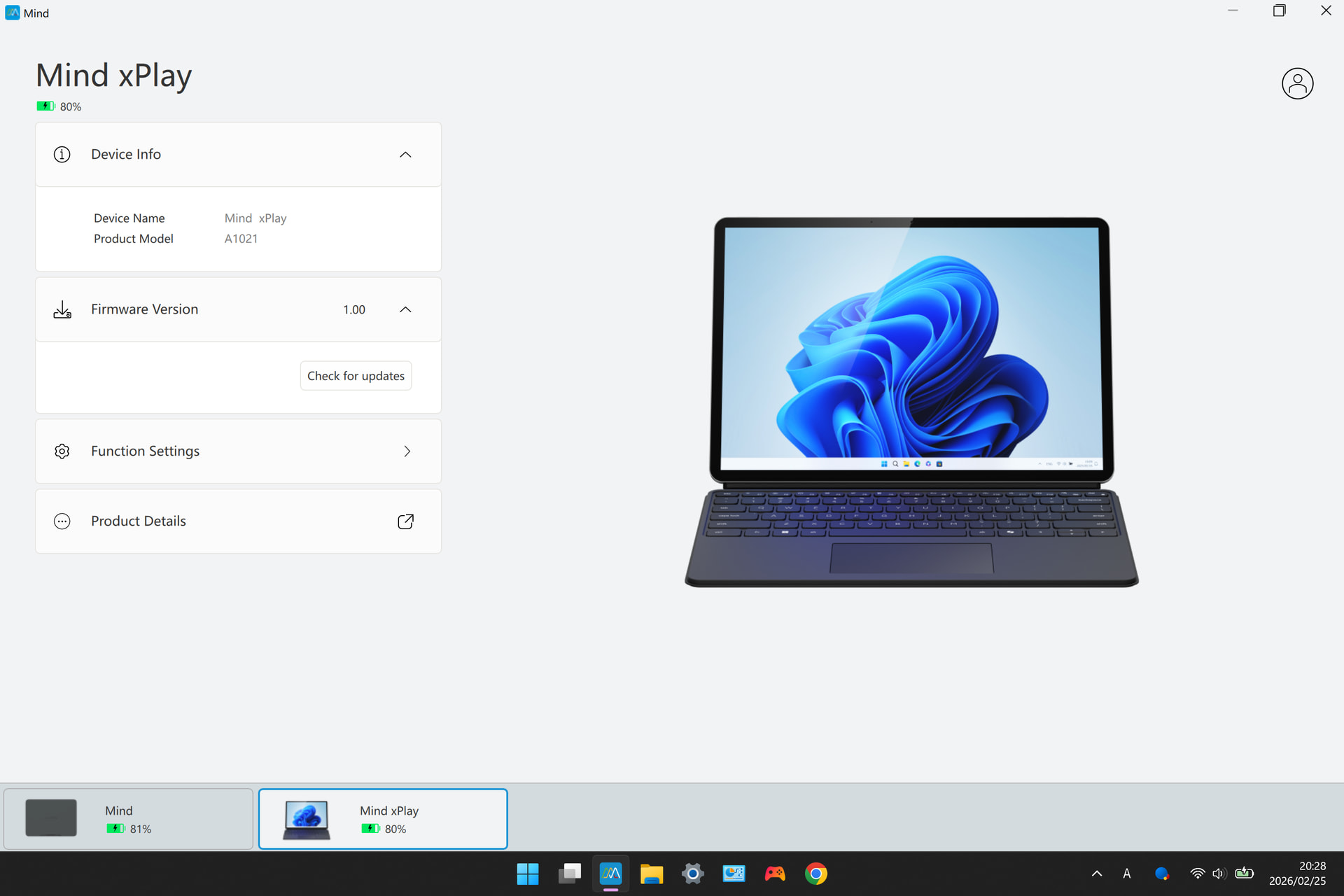
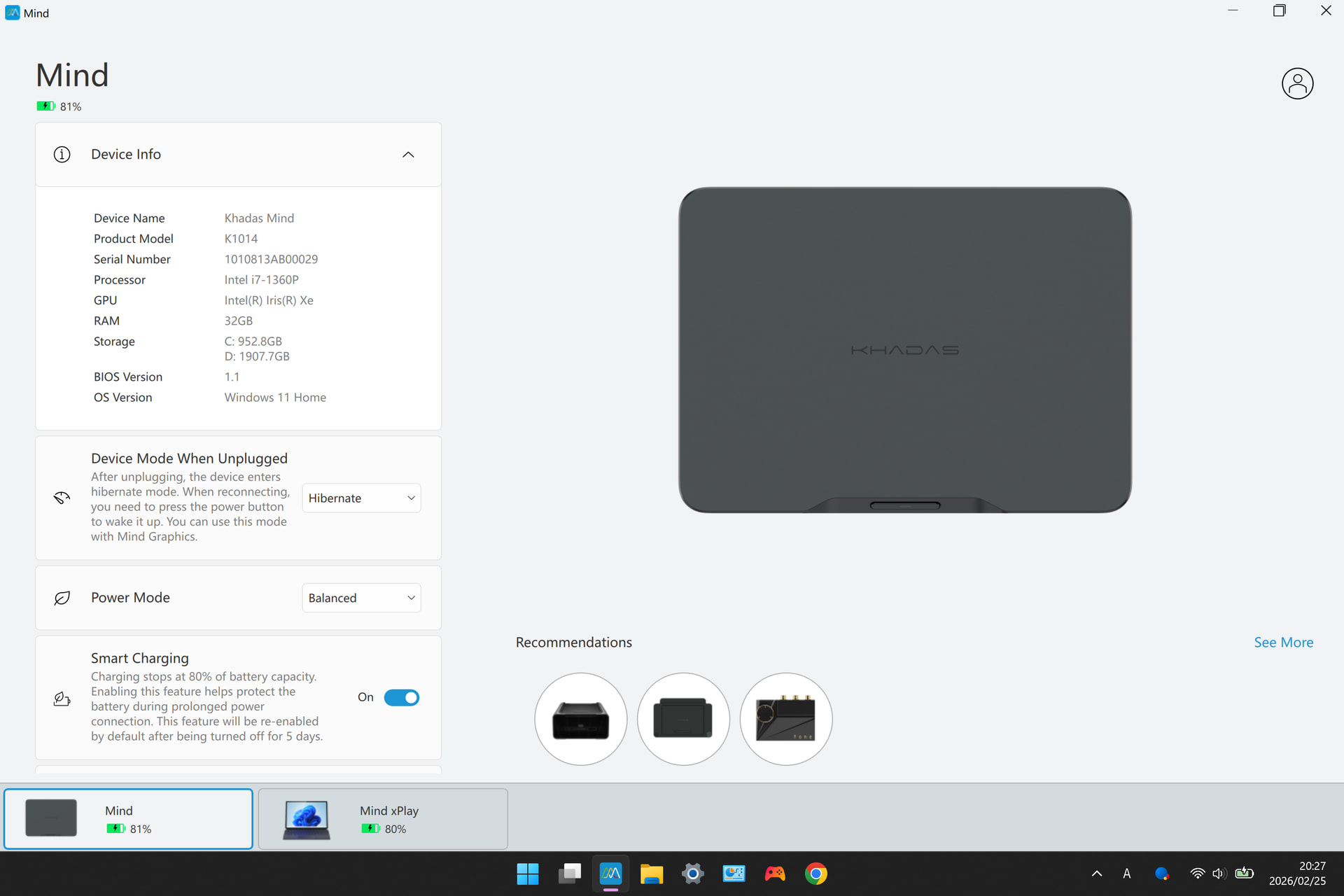
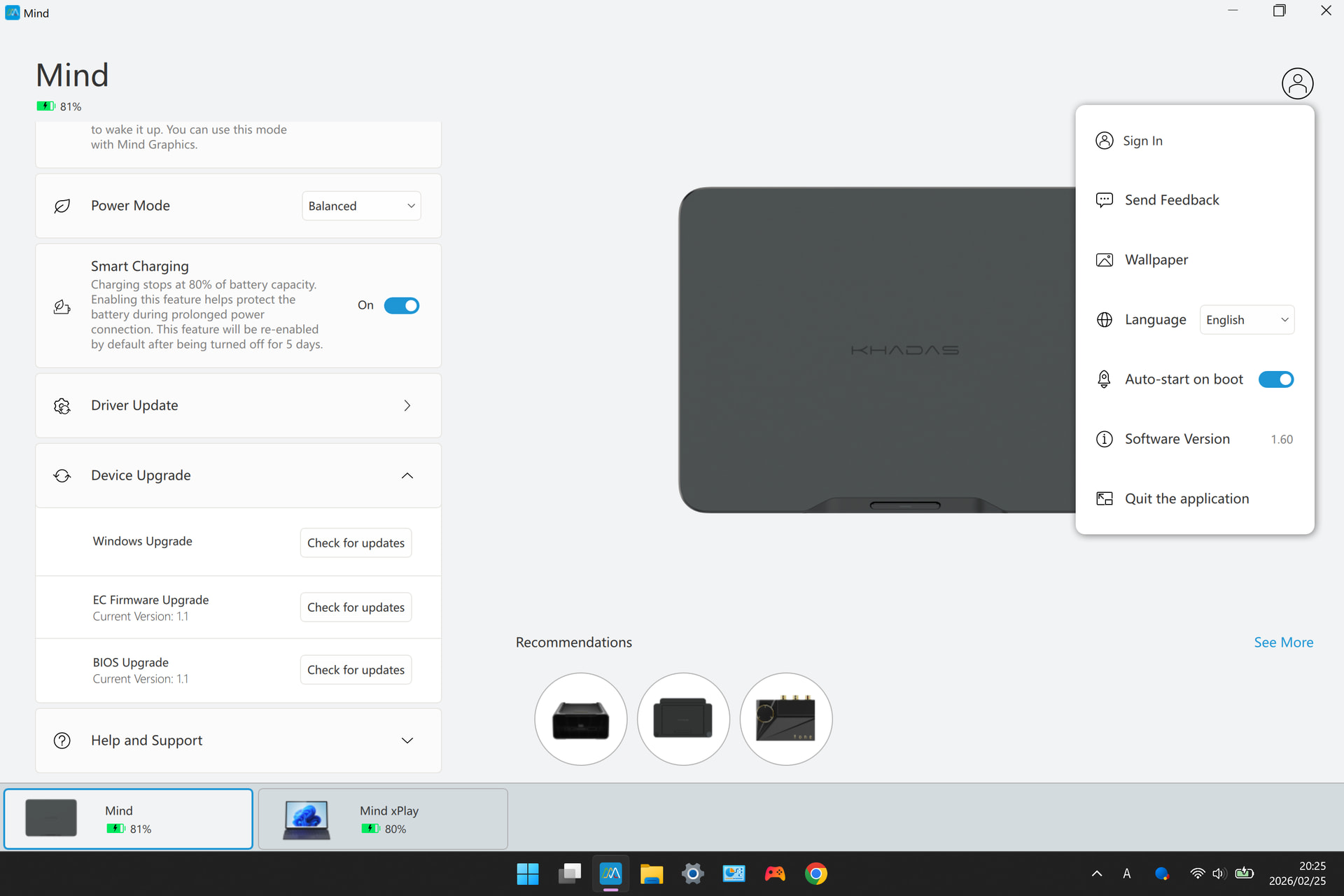
There is no battery status visible within Windows. The Mind App shows the xPlay battery level stuck at 80% at all times with no change, regardless of actual charge state. For additional context: the Mind’s battery charge limit is set to 80% in the Mind App, and this Mind unit is normally used with Mind Graphics (RTX 4060 Ti 8GB) via Mind Link. As a result of no accurate status being shown, there is no warning before the battery runs out, causing a sudden and unexpected shutdown.

3. Buzzing noise after battery depletion

After the xPlay battery runs out, the Mind continues running and a buzzing/crackling noise comes from the xPlay speakers. The noise stops when the Mind is shut down.


Please let me know if you need any additional information such as serial numbers, firmware versions, or logs — happy to provide whatever would be helpful.

Thank you.
1 Like

Jumping on the thread; also hoping for assistance.

I have the same model Mind 1 (i7-1360P) as you, also normally used full-time with the Mind Graphics 1. The Mind and all peripherals are fully updated on Windows 11 Home and via the Mind App. I received my xPlay with keyboard yesterday, and noted similar issues with battery life, odd screen brightness controls between keyboard and Mind App, and a general unresponsiveness for the computer to boot at all with any power button until on AC power via USB-C. I was going to perform a reset and fresh install of Windows, as this helped with some of the bugs I had when I received my Mind Graphics.

However, today when I booted, attached to the xPlay, I noted that my sound was severely garbled at low volumes and had a constant buzzing noise, like a ground, from the speakers, I assume much like you’re experiencing. This was a new development from last night. The computer had been fully shut down and separated from the xPlay between them and now. I assumed it was still something software-side, until I powered off and detached my Mind, then hooked up my phone via USB-C as an external display. The buzz was still present, worse at low volumes and almost imperceptible at max volume.

So it’s a hardware problem within the xPlay. For a premium component of a premium modular system, I certainly expected better Day One quality, and I hope there’s a resolution beyond returning it.

1 Like

Hi Sir,

Did you update your Mind Computer’s EC and BIOS via Mind APP V1.60?

Hi Sir,

Before using xPlay for the first time, you need to connect an adapter to activate it and get it out of transport mode.

Regarding battery power and xPlay’s brightness control, please first upgrade the Mind APP to V1.60, and then use the Mind APP to update Mind’s EC and BIOS. This is to enable Mind to adapt to the functions of xPlay.

Could you please provide more information to supplement the issue of “Buzzing noise after battery depletion”?

Hi Sir,

Before using xPlay for the first time, you need to connect an adapter to activate it and get it out of transport mode.

Regarding battery power and xPlay’s brightness control, please first upgrade the Mind APP to V1.60, and then use the Mind APP to update Mind’s EC and BIOS. This is to enable Mind to adapt to the functions of xPlay.

Could you please provide more information to supplement the issue of “Buzzing noise after battery depletion”?

Thank you for your response.

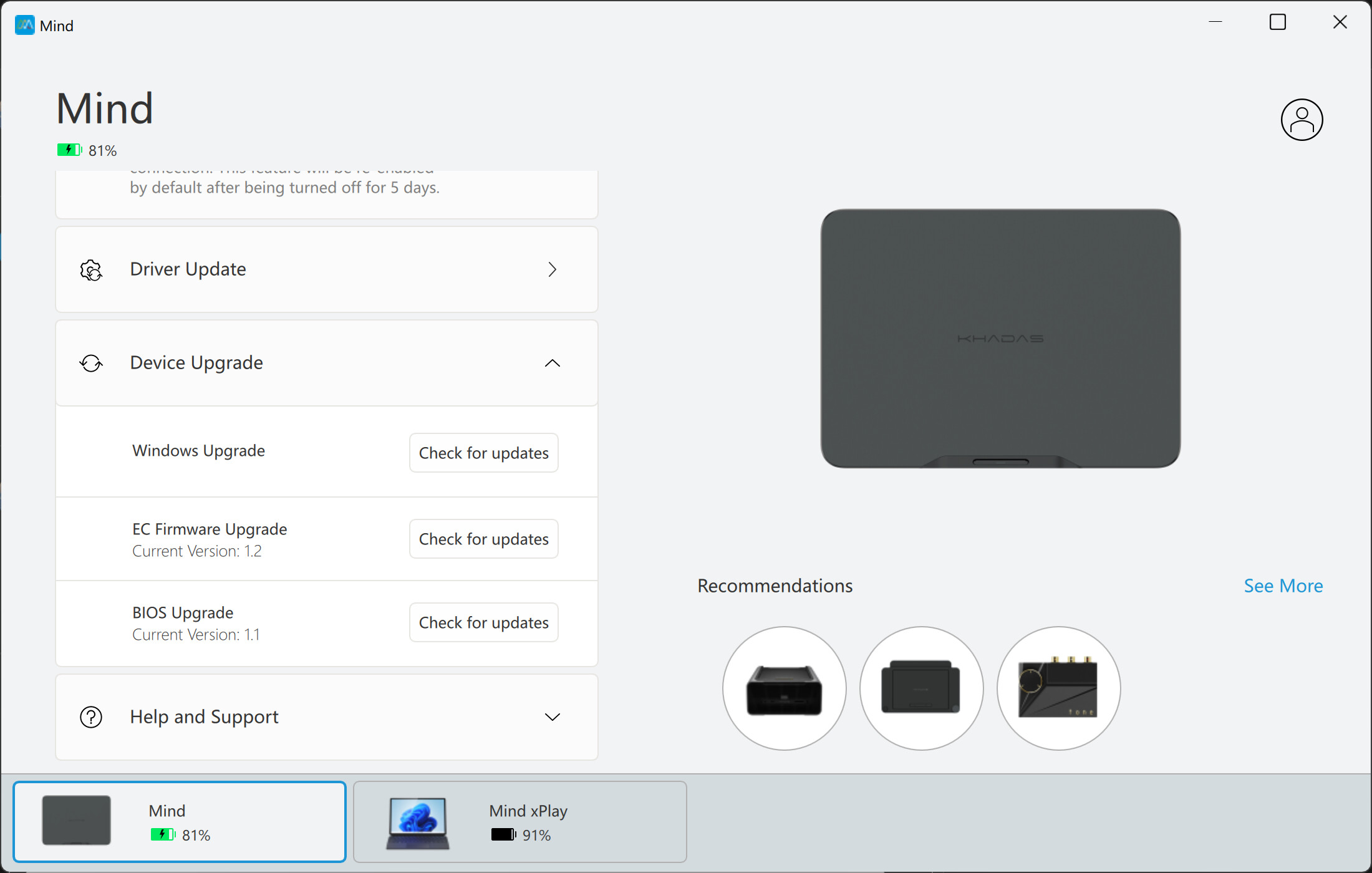
Regarding the software and firmware versions, all are confirmed up to date via the “Check for updates” button in the Mind App:

  • Mind App: V1.60

  • EC Firmware: 1.1 (up to date)

  • BIOS: 1.1 (up to date)

  • Mind xPlay Firmware: 1.00 (up to date)

Regarding transport mode: the xPlay has been charged and discharged several times, is recognized by the Mind App, and is successfully powering the Mind via Mind Link during battery operation. If a specific activation procedure is still required beyond this, could you please provide the steps? I reviewed the Mind xPlay user manual (https://dl.khadas.com/products/mind-xplay/manuals/mind-xplay-portable-display-manual-en.pdf) but could not find any relevant instructions.

I would also like to add one issue not mentioned in my original post: brightness adjustment for xPlay is not available within the Mind App.

Regarding the buzzing noise: the sequence of events is as follows — when the xPlay battery is depleted, xPlay stops display output. However, as Mind continues to receive power from xPlay via Mind Link, it remains running for a period of time. During this window, a buzzing noise comes from the xPlay speakers. Once xPlay stops supplying power to Mind and Mind shuts down, the noise stops. Fortunately, this has not occurred in the last two attempts. If it happens again, we will provide a video.

We also look forward to your thoughts on the battery life issue raised in the original post.

I did read in the manual that the first time you use the xPlay, it needed to be connected to external power. However, my problem with getting the Mind + xPlay to boot happens every time from a cold shutdown: there is no response from either power button until I plug in to an adapter, and see the yellow indicator light. For example, just now I couldn’t boot until plugging in to a charger, and both units appear to have about 75% battery (reported by Mind App) once I booted, and I am now unplugged and on battery.

I have also confirmed that I am running Mind App 1.60, EC 1.1, BIOS 1.1, xPlay Firmware 1.0.

My audio problem is a consistent quiet EMI/ground buzz from both speakers while the xPlay is powered on, using either phone over USB-C and Mind Link inputs. Without any audio being played, it could be mistaken as fan noise from the Mind unit, which is why I tested it using the USB-C input from my phone. While playing any audio, this interference garbles music and video audio significantly, regardless of the audio volume. I suspect there is a ground somewhere in the circuit, or the speakers are bad, either of which would require repair/replacement of the unit.

Hi Sir,
Thank you for your feedback. Based on the information you provided, it seems that both of you are using the Mind 1 computer.
I will first check the backend data to confirm if we have missed pushing the EC update package for the Mind 1, and arrange for engineers to handle it promptly. I will also synchronize the issues you have raised to the after-sales manager. If you find more problems, please continue to provide feedback, such as whether there are any unresponsive button functions. This will be more helpful for us to troubleshoot the issues.
Thank you for your patience, dear friends. We will speed up the investigation and help you solve the problem. Thank you for your support, again.

2 Likes

Hi Sir,
Thank you for your feedback. Based on the information you provided, it seems that both of you are using the Mind 1 computer.
I will first check the backend data to confirm if we have missed pushing the EC update package for the Mind 1, and arrange for engineers to handle it promptly. I will also synchronize the issues you have raised to the after-sales manager. If you find more problems, please continue to provide feedback, such as whether there are any unresponsive button functions. This will be more helpful for us to troubleshoot the issues.
Thank you for your patience, dear friends. We will speed up the investigation and help you solve the problem. Thank you for your support, again.

Hi Sir
We have initially identified an anomaly in the Mind APP backend. Some users may not receive the update push notifications for EC or BIOS.
We will upload the latest versions of EC or BIOS for Mind 1, Mind 2, and Mind 2s as soon as possible and release an update tutorial to guide everyone to update manually. Please give us some time to sort this out (as the engineers are still on vacation, it will take us a few days).
After the release, I will update the relevant information here.
We are very sorry for the unpleasant experience we have caused you all. We sincerely apologize again.:sob:

2 Likes

I’ll join to report similar issues, beside version 1.6 of the app there’s no other update available. I’m also on Mind 1, hoping for the updates to get pushed and resolve all of the problems

2 Likes

Hi Sir,

Our engineers have returned from their vacation! We are currently working on the solution.

Thank you all for your patience!

And I will update the progress tomorrow.

2 Likes

Hi Sir,

Users of Mind 1 who have purchased xPlay or Graphics 2, please download the EC update package for Mind 1 V1.02 from our official server(https://dl.khadas.com/products/mind-series/ec/mind-1/mind-ec-v1.02-250928.zip). Then, follow the tutorial to update the Mind 1 using a USB drive in the BIOS interface(https://dl.khadas.com/products/mind-series/ec/mind-1/how-to-update-ec-from-usb-drive.pdf).

Please do not connect xPlay or Graphics 2 while updating the EC. Use the Mind 1 with a regular monitor only. The update process is expected to take 5-10 minutes. After the update is complete, unplug and reconnect the power to the Mind, then press the button to power it on.

Note: This EC update package and tutorial are for Mind 1 users only. Mind 2 and Mind 2s users are strictly prohibited from using it.

For users of Mind 2 or Mind 2s, please give us more time. We are working tirelessly to resolve the issues. Thank you very much for your understanding!

My unit has been on EC Firmware version 1.1 for a while now, isn’t 1.02 a downgrade? Also will this be pushed on the Mind app? Or we can only update manually?

Hi,

Read from the Mind APP that the current EC version is 1.1, while the actual EC version is 1.01. This is only due to differences in how the Mind APP reads the EC version, so there’s no need to worry.

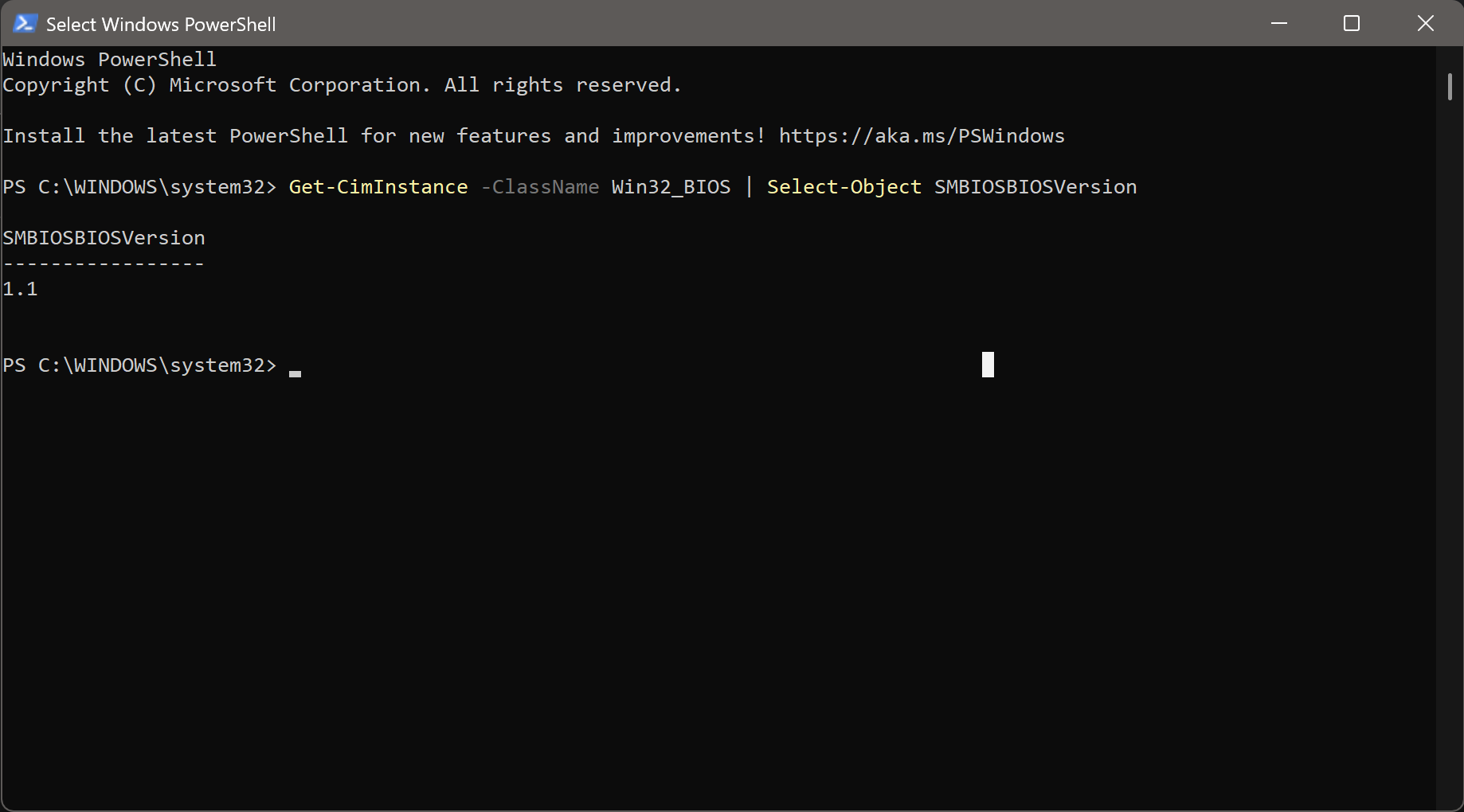
You can also verify the EC version of the device by running the following command in Windows PowerShell. Get-CimInstance -ClassName Win32_BIOS | Select-Object SMBIOSBIOSVersion

Hi Darryl,

I downloaded the EC update from your link and installed it following your directions. I now see EC V1.2 in the Mind App.

Regardless, there is no indication that this changed anything with my audio issues with the xPlay. I still have a buzzing/static noise on my speakers that disrupts any audio being played, being more noticeable below 10% system volume. I am growing more certain this is a hardware issue rather than a software one.

I have yet to test battery life. Everything feels more responsive on the xPlay today, though I will note that I did perform a full system restore with a fresh install of Windows 11 this weekend, which certainly contributes to system performance.

Thank you for working on this problem; I hope the EC update helps others.

James

Also, the PowerShell command your provided seems to be for BIOS version, not EC version.

Hi James,

Regarding the speaker issue, could you please provide a video or audio recording to help us better understand the problem? Based on the information you’ve provided so far, we also suspect that the likelihood of a hardware issue is quite high.

We still have a minor software issue where every time you reconnect xPlay, the Mind working mode switches to power-saving mode. This reduces the CPU’s power, leading to a slight decrease in performance. If you want to switch to performance mode or balanced mode, you’ll need to temporarily adjust it in the Mind APP.

Please test the button to the right of F12 that looks like a dashboard. Its function can be set in the Mind APP, and by default, pressing it alone will switch the working mode.

Regarding checking the EC version, thank you for your correction. I had a misunderstanding during my own testing. Another method is to use the shortcut Windows + R to open Run, type “msinfo32,” and you can also see the software version of the embedded controller.

We apologize for the experience you’ve had. We won’t shy away from the issue, and we look forward to receiving more feedback from you. Our after-sales channels are always open. If we cannot quickly resolve the issue for you, we will honor our commitment to provide a replacement or refund. Thank you for your support!

Thank you for providing the update. I followed the instructions and updated Mind 1 BIOS to V1.02 via USB drive in the BIOS interface.

After the update, I can confirm the following improvements:

  • xPlay battery level is now displayed correctly in the Mind App

  • Windows now shows battery status based on the xPlay battery

I also noted your comment regarding the known issue where reconnecting xPlay switches the Mind working mode to power-saving mode. This may have affected my battery life measurements.

Regarding battery life, could you let us know what the ideal expected battery life is when using Mind 1 with xPlay via Mind Link under light workloads? Additionally, is it possible that the current battery life is still being affected by remaining software issues, and that further improvement can be expected with future updates?

Finally, this update was applied manually via USB drive rather than through the Mind App. Could you let us know how future updates for Mind 1 will be delivered — and whether they will eventually be available through the Mind App?

Hi Yu,

The operating modes of the Mind are achieved by limiting the CPU’s power. The average power and peak power vary across different modes. We recommend selecting a mode based on your actual needs. For example, when I’m only reading documents or replying to work messages, I choose the power-saving mode. If I’m using Microsoft Edge(Edge is really something worth complaining about…) and need to write documents at the same time, I opt for the balanced mode. I rarely use the performance mode on the xPlay.

Our benchmark for battery life testing is the Mind 2. Using PC Mark to simulate office work, it can achieve 3 hours or more of usage. In my own experience, using the Mind 2 and xPlay combination for office work, the actual battery life feels like it ranges between 2.5 to 3.5 hours. This varies depending on my workload, as I’ve noticed that my background memory usage often starts at 16GB. Our internal tests have found that the battery life of the Mind 1 is about 5% to 10% weaker than that of the Mind 2.

As for the Mind 1, its battery life may no longer see significant improvements through software updates in the future. This is due to its design architecture. Since its release, we’ve been working hard to optimize it, but the remaining room for improvement is very limited… I hope you understand my hesitation in saying this.

In the future, software updates for all Mind computers will continue to be provided through the Mind App. However, because there is an ongoing issue with the Mind App’s background processes that we are still addressing, we have temporarily provided an alternative solution via USB for updates. Both of these update methods are long-term supported, so please don’t worry.

Thanks!

1 Like