0001-meta-meson-VIM4N-4-add-support-for-4G-EM06.patch (2.4 KB)
Refer to the patch provided in the attachment, add the configuration related to the 4G module in the meta-meson/recipes-kernel/linux/5.15/g12b.cfgfile, then try compiling again.
1 Like
For the missing NPU .so file issue, please proceed with the manual push method for now. We will update you after the issue is fixed
1 Like
@Naruto-China I’m trying to use fw_printenv and fw_setenv on yocto image for OTA control, I’ve tried different device names and offsets in /etc/fw_env.config, such as /dev/mmcblk0 0x400000 0x10000 etc. but I keep getting the following error:
root@mesong12b-kvim3-k5:~# fw_printenv
Cannot read environment, using default
Cannot read default environment from file
When checking the U-Boot source, I found:
#define CONFIG_ENV_SIZE (64*1024)
in kvim3.h line 364, but there is no CONFIG_ENV_OFFSET defined. Also, defining CONFIG_ENV_IS_IN_MMC is blocked by this line (I think it was already defined for EMMC) :
#if (defined(CONFIG_ENV_IS_IN_AMLNAND) || defined(CONFIG_ENV_IS_IN_MMC)) && defined(CONFIG_STORE_COMPATIBLE)
#error env in amlnand/mmc already be compatible;
#endif
Do you have any idea about where the U-boot environment is stored in EMMC to define in /etc/fw_env.config? Thanks in advance.
Hello Khadas Team,
I am using the **Khadas Yocto SDK (Base version)**, downloaded from:
According to the official documentation ( VIM1S Build Yocto [Khadas Docs] ), VIM1S should be supported. However, I encountered an issue during the build process.
------------------------------
## Issue Description
When running `bitbake amlogic-yocto`, the **u-boot compilation stage fails**:
Build s4 bl30 of kvim1s…Please wait…arch_dir: , soc_dir:
invalid board kvim1s
valid boards are:
sc2_ah212
sc2_ah219
sc2_u212
t5_ak301_v1
t5_ak309_v1
t5_ak311_v1
t5_ak329_v1
t5d_am301_v1
t5d_am309_v1
t5d_am311_v1
t5d_am319_v1
kvim4
t7_an400_lpddr4x
t7_an400_mercury
t7_an400p_lpddr4x
t7_an408_lpddr4x
t7_an409_ddr4
t7_an40a1
t7_skt
t7_t319
s4_ap201
s4_ap222
s4_ap229
s4_ap232
s4_aq222
s4_skt
s4_t211
t3_skt
t3_t963d4
t3_t965d4
t3_t982
p1_as400
p1_as408
p1_as409
p1_ninox_4
p1_skt
t5w_at301
t5w_skt
a5_av400
a5_av409
a5_skt
Error: Build bl30 failed… abort
WARNING: exit code 255 from a shell command.
ERROR: Task (/home/liqingbao/yocto/meta-meson/recipes-bsp/u-boot/u-boot_2019.01.bb:do_compile) failed with exit code ‘1’
WARNING: qtbase-5.15.7+gitAUTOINC+358aebba72-r0 do_configure: QA Issue: qtbase: invalid PACKAGECONFIG: xkb [invalid-packageconfig]
------------------------------------------------
Additionally, the directory `aml-comp/uboot/bl33/v2019/configs` only contains:
khadas-vim2_defconfig
khadas-vim_defconfig
------------------------------------------------
## Questions
- Does the Yocto SDK currently fully support VIM1S?
- If it does, how can I fix this build issue for VIM1S?
It is suported. please check:
How to resolve the U-Boot error that occurs when using bitbake amlogic-yocto according to the documentation?
Hello @bao11
Please double check your environment and use the original code to build.
Hi @Naruto-China , I enabled the kernel options as shown in the patch, but I still get the same error when trying to enable the 4G connection.
The wwan device is in the device list, but NetworkManager does not associate it with the 4G connection:
Error: Connection activation failed: No suitable device found for this connection (device lo not available because device is strictly unmanaged).
This happens even if I manually force the wwan device to be managed.
I have ttyUSB* interface and can use ModemManager to establish the connection (got 4G signal), but the corresponding network interface does not appear.
@Naruto-China Finally, I was able to set up a 4G connection using PPP and obtained a ppp0 interface with an IP address. However, this required configuring several files and performing multiple additional steps. I think this is different from the method Khadas uses with NetworkManager.
Hi @Naruto-China, I found the uboot offset is 0x4d400000, which can work with fw_printenv. However, the offset is not defined in defconfig or kvim3.h.
And I noticed that SWUpdate is integrated by default in Yocto, has it been tested?
Hi,
I flashed my VIM3 with the https://dl.khadas.com/products/vim3/firmware/yocto/emmc/vim3-yocto-250123.img.xz Yocto image. It worked fine, but unfortunately no toolchain is provided for this image.
So I follow the steps from VIM3/3L Build Yocto [Khadas Docs] and use the docker image from wesion/yocto-amlogic to build the yocto image for my VIM3.
bitbake amlogic-yocto
works fine for me but when I try to build the toolchain via -c populate_sdk I got an error in libepoxy_1.5.10.bb:do_compile
FAILED: src/libepoxy.so.0.0.0.p/meson-generated_.._gl_generated_dispatch.c.o
| In file included from ../git/include/epoxy/egl.h:46,
|                  from ../git/src/dispatch_common.h:59,
|                  from src/gl_generated_dispatch.c:26:
| include/epoxy/egl_generated.h:11:10: fatal error: EGL/eglplatform.h: No such file or directory
|    11 | #include "EGL/eglplatform.h"
|       |          ^~~~~~~~~~~~~~~~~~~
| compilation terminated.
| ninja: build stopped: subcommand failed.
| WARNING: exit code 1 from a shell command.
Summary: 1 task failed:
virtual:nativesdk:/home/khadas/yocto/vims-yocto-sdk/poky/meta/recipes-graphics/libepoxy/libepoxy_1.5.10.bb:do_compile
Has anyone been able to successfully generate a toolchain from amlogic-yocto?
Hi, when booting Yocto, sometimes there are timeout errors starting the WiFi device. Any idea how to fix this?
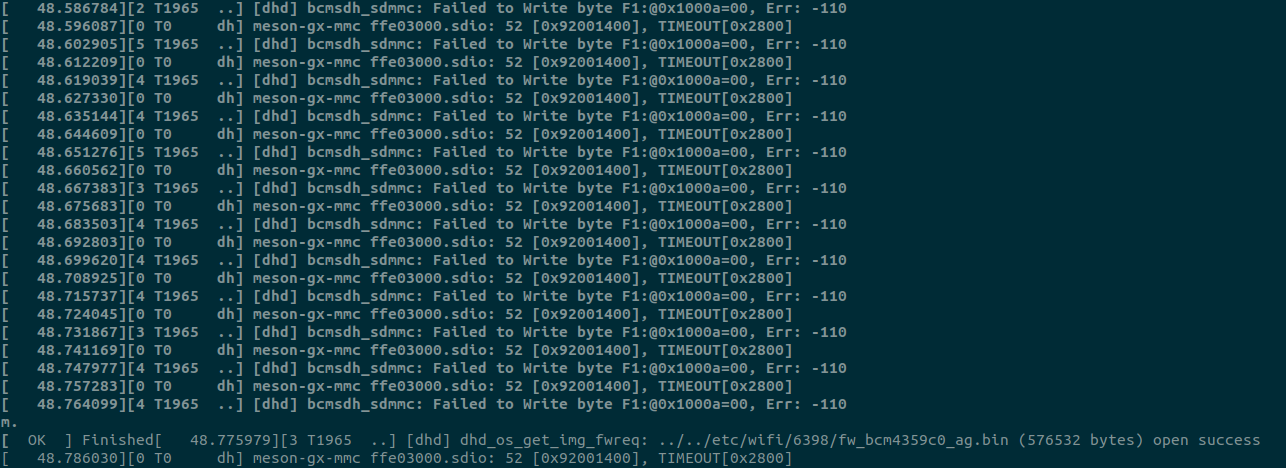
Hello @JJ1997
Do you have issues with the original images?