I find all the rootfs will be copied into the initramfs. You can just test it with adding an extra space in rootfs without modifying or adding packages in the orginal sdk. For example, add this in local.conf.
IMAGE_ROOTFS_EXTRA_SPACE = “3145728”

I find all the rootfs will be copied into the initramfs. You can just test it with adding an extra space in rootfs without modifying or adding packages in the orginal sdk. For example, add this in local.conf.
IMAGE_ROOTFS_EXTRA_SPACE = “3145728”
I think there is an issue with the U-Boot configuration.
When I tried to check the defconfig name using bbnote, the UBOOT_TYPE variable was empty.
NOTE: UBOOT_TYPE=
NOTE: DEFCONFIG=_defconfig
And I’m not sure if the FINAL_DEFCONFIG_PATH is good. It seems it should be ${S}/bl33/v2015/board/khadas/defconfigs? because in ${S}/bl33/v2015/board/amlogic/defconfigs we have nothing related to kvim3_config (UBOOT_MACHINE)
Hello @JJ1997
We will check this issue. @Naruto-China pls follow up.
@numbqq Could you also check this issue? Due to the limitations of initramfs, we cannot increase the rootfs size or add new packages. Thanks!
Hello @JJ1997
Could you provide the patches you add packages to us based on the orignal code? We want to reproduce this issue on our side.
Hello @numbqq, as explained here, you can producre this issue by add increasing rootfs size in the original khadas source.
By the way, I think remove initramfs-recovery in recovery-image.bb can disable initramfs.
IMAGE_INSTALL:remove = " initramfs-recovery"
Hello @JJ1997
OK, I have reproduce this issue, we will check on our side.
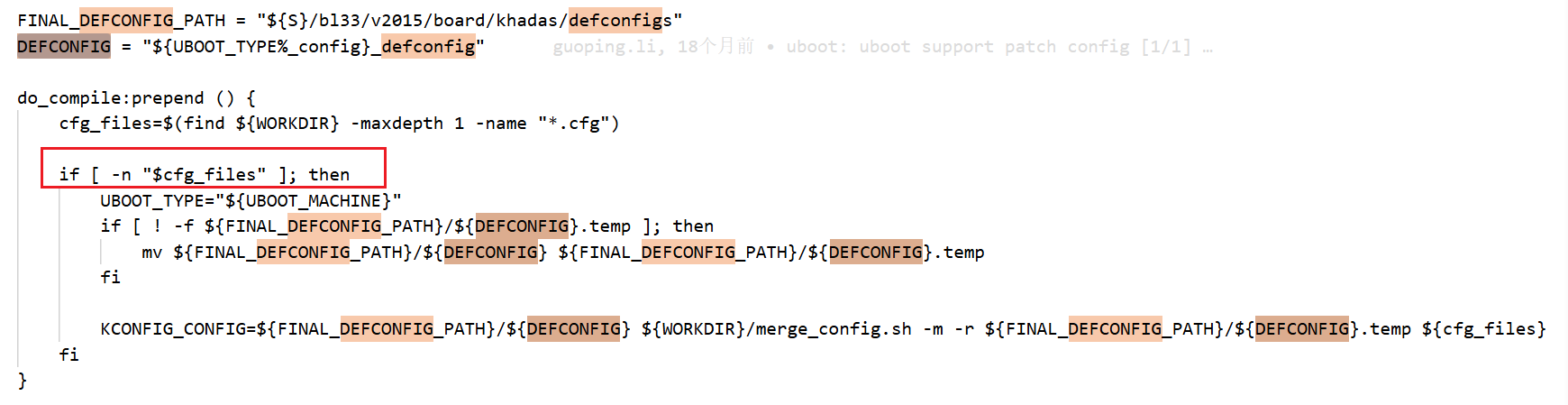
FINAL_DEFCONFIG_PATH variable points to${S}/bl33/v2015/board/khadas/defconfigs. As shown in the figure below, the directory contains the kvim3_defconfig file, which is the configuration file for U-Boot.
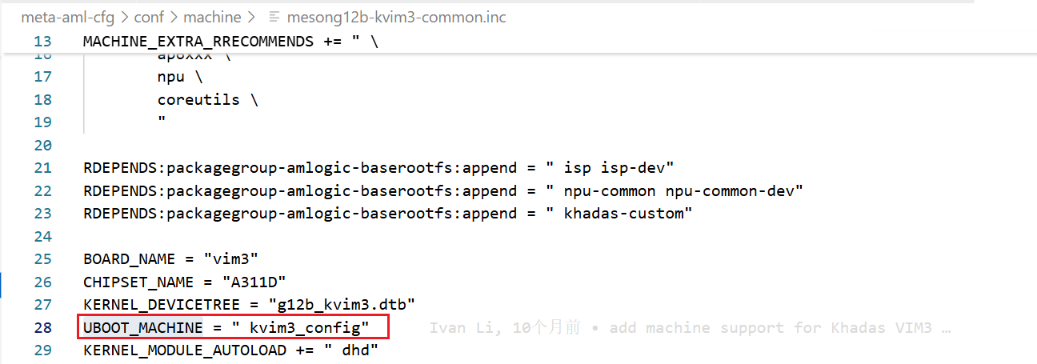
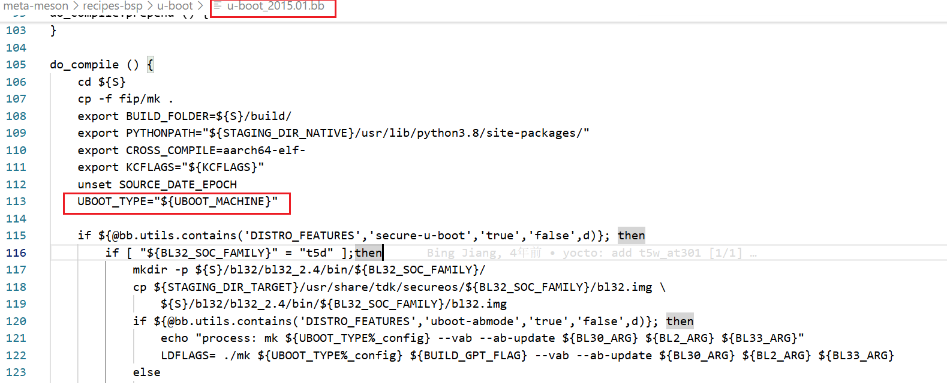
meta-aml-cfg/conf/machine/mesong12b-kvim3-common.inc, the kvim3_config variable is assigned to UBOOT_MACHINE.meta-meson/recipes-bsp/u-boot/u-boot_2015.01.bb, the UBOOT_MACHINE variable is used to assign a value to UBOOT_TYPE, where UBOOT_TYPE = kvim3_config.kvim3_config not being located in the${S}/bl33/v2015/board/khadas/defconfigs directory, please refer to the figure below. The following details can be observed in the meta-meson/recipes-bsp/u-boot/u-boot_2015.01.bbfile.${UBOOT_TYPE%_config}_defconfig performs the following operations:
${UBOOT_TYPE}(e.g., kvim3_config→ kvim3)kvim3→ kvim3_defconfig)DEFCONFIG variable, yielding:DEFCONFIG = kvim3_defconfig
DEFCONFIG = kvim3_defconfig , which corresponds exactly to the kvim3_defconfig file located in the ${S}/bl33/v2015/board/khadas/defconfigs directory.UBOOT_TYPE and DEFCONFIG variables being empty, I am not clear about the specific location where your bbnote is being printed.UBOOT_TYPE variable is located in the meta-meson/recipes-bsp/u-boot/u-boot-2015.01.bb file. After UBOOT_TYPE is assigned a value, the DEFCONFIG variable will also be assigned a value through string concatenation.Hello @Naruto-China, thank you very much for your detailed reply. I understand the points you explained.
However, I think the problem is here.
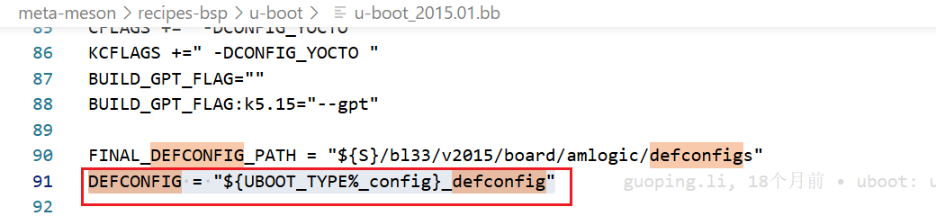
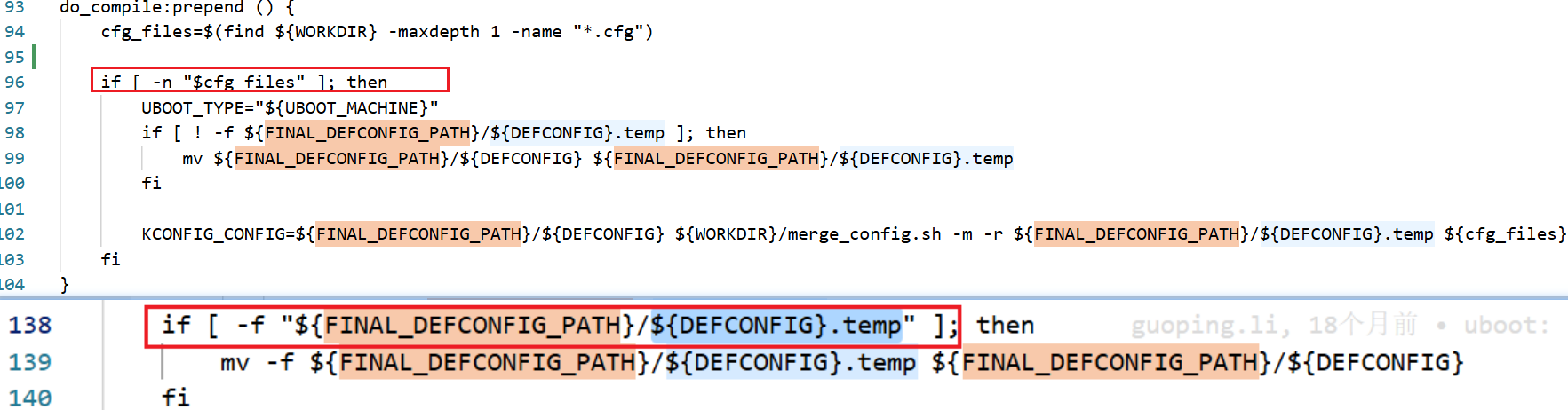
The FINAL_DEFCONFIG_PATH in line 90 in u-boot_2015.01.bb is defined as ${S}/bl33/v2015/board/amlogic/defconfigs not ${S}/bl33/v2015/board/khadas/defconfigs. As shown below.
This makes the do_compile:prepend does not work (if we have additional .cfg file to be merged by merge_config.sh, we will run do_compile:prepend).
Other point, the DEFCONFIG is defined (line 91) before the UBOOT_TYPE is defined in do_compile:prepend and do_compile, so it’s empty for do_compile:prepend and do_compile ?
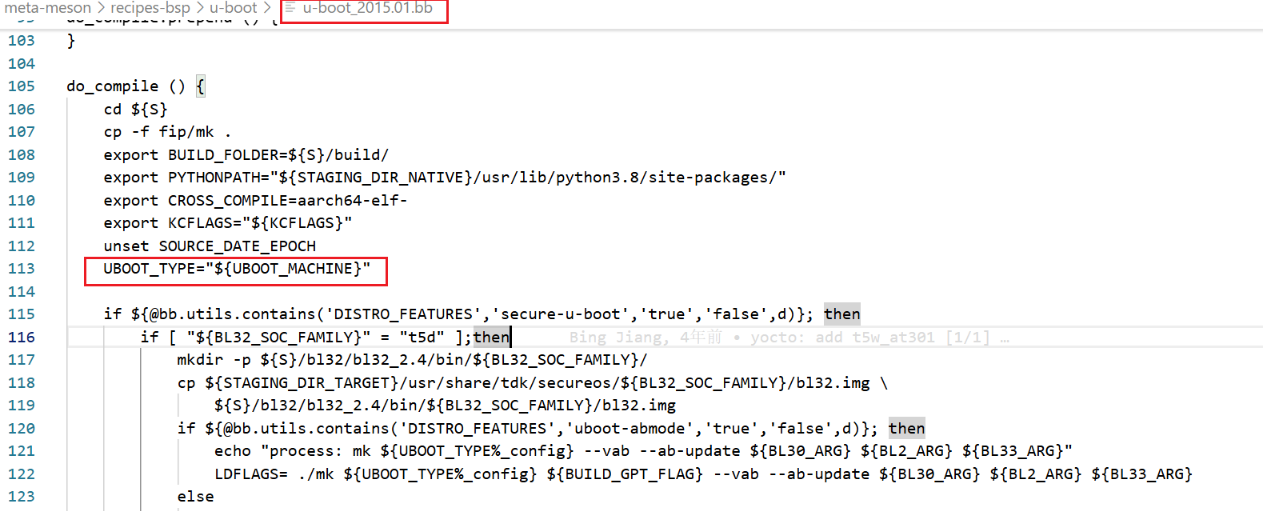
do_compiletask, after UBOOT_TYPEis assigned a value (line 114), using bbnoteto print and verify confirms that the variable contains a value. The figure below shows my print result:DEFCONFIGis merely variable initialization; even if defined before UBOOT_TYPE, it does not matter. After UBOOT_TYPEis assigned a value (line 114 or line 97), DEFCONFIGwill likewise contain a valid value. You can verify this by adding a bbnoteprint statement after line 114 to observe the result.do_compile:prepend function, both UBOOT_TYPE and DEFCONFIG are indeed empty. This is due to the cfg_files variable being empty, as shown in the figure below.FINAL_DEFCONFIG_PATH variable indeed needs to be modified to ${S}/bl33/v2015/board/khadas/defconfigs . However, since no cfg files exist and there is no ${DEFCONFIG}.temp file, even an incorrect directory assignment here does not affect functionality.@Naruto-China ,OK, I need to modify these elements because I enabled absystem feature, and there’s a cfg file that needs to be merged.
Could you tell me where the ${S}/bl33/v2015/board/khadas/defconfigs is defined to be used? maybe in another file? This is the final defconfigs to be used or there is other gerneal config?
In fact, I want to update u-boot config, but I’m not sure where to do this, as the menuconfig is not available in this version 2015.
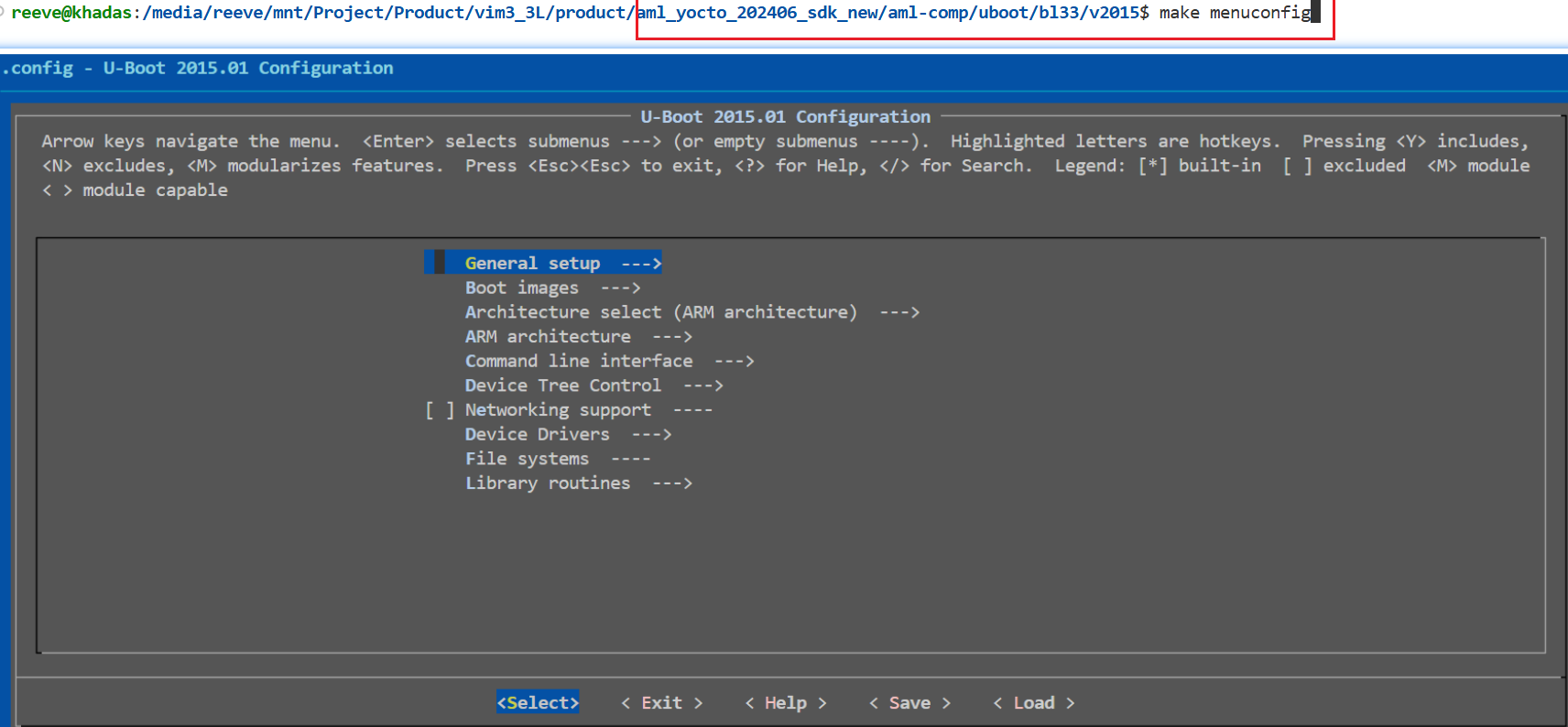
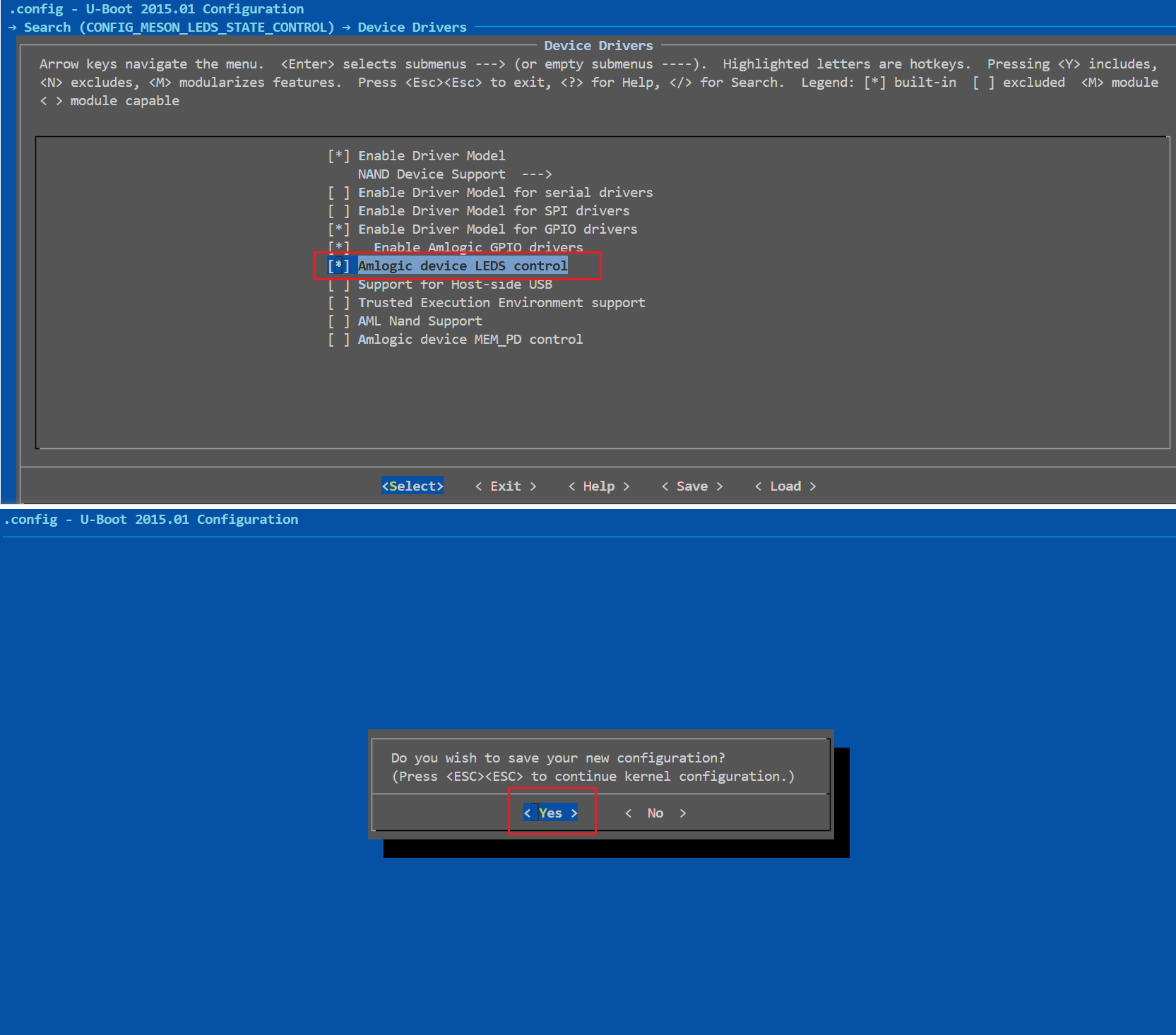
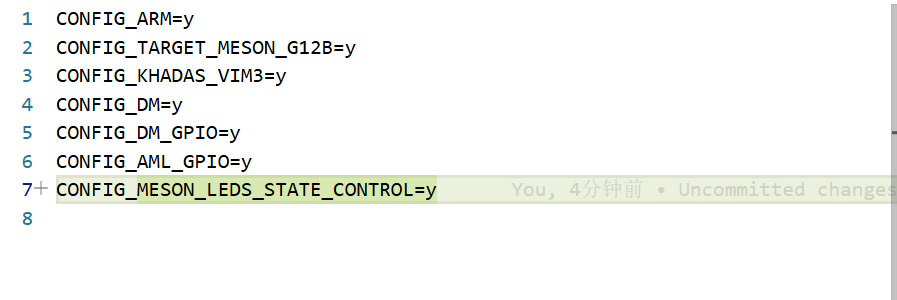
kvim3_defconfig file in the directory ${S}/bl33/v2015/board/khadas/defconfigs/ is the u-boot config for the VIM3 board.${S}/bl33/v2015 directory and execute make menuconfig to launch the config menu.CONFIG_MESON_LEDS_STATE_CONTROL , select the option "Amlogic device LEDS control" as shown in the figure below, then exit and save the configuration.${S}/bl33/v2015 directory and execute make savedefconfig to save the configuration changes into the defconfig file.
${S}/bl33/v2015/build/ directory and copy the contents of the generated defconfig file to kvim3_defconfig . This action updates the U-Boot configuration for the target board.
kvim3_defconfig file is shown in the figure below.Hi @Naruto-China @numbqq , could you please confirm whether the NPU is fully supported in the Yocto SDK? I was able to find /dev/galcore in Yocto, but our application, which uses the NPU and works well on fenix Ubuntu 20.04/22.04, does not function correctly in Yocto.
I’m still debugging in our application to find more information, when it runs inference, it restarts without error inside application, there should be an issue with an external driver or missing support NPU. Do you know if there are any additional kernel options, drivers, or modules that need to be enabled or mounted for the NPU to work?
I updated the permissions of /dev/galcore from:
crw------- 1 root root 199, 0 /dev/galcore
to
crwxrwxrwx 1 root root 199, 0 /dev/galcore
to avoid error of “Failed to open device”, but this did not resolve the issue.
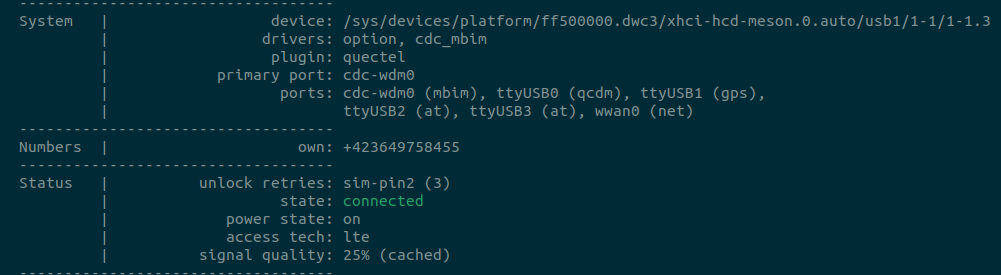
By the way, it seems the module 4G Quectel does not work in Yocto, same steps in this documation VIM3/3L EM06 LTE 4G Module [Khadas Docs] works for ubuntu
Hello @numbqq, any feedback regarding the NPU support in yocto? I tested NPU demo using KSNN KSNN Usage [Khadas Docs] . but encountered a library error. Not found libGL.so.1.
(venv) root@mesong12b-kvim3-k5:~/ksnn/examples/keras# python3 xception.py --model ./models/VIM3/xception_uint8.nb --library ./libs/libnn_xception_uint8.so --picture data/goldfish_299x299.jpg --level 0
Traceback (most recent call last):
File “/home/root/ksnn/examples/keras/xception.py”, line 5, in
from ksnn.api import KSNN
File “/home/root/ksnn/venv/lib/python3.10/site-packages/ksnn/api.py”, line 6, in
import cv2 as cv
File “/home/root/ksnn/venv/lib/python3.10/site-packages/cv2/init.py”, line 181, in
bootstrap()
File “/home/root/ksnn/venv/lib/python3.10/site-packages/cv2/init.py”, line 153, in bootstrap
native_module = importlib.import_module(“cv2”)
File “/usr/lib/python3.10/importlib/init.py”, line 126, in import_module
return _bootstrap._gcd_import(name[level:], package, level)
ImportError: libGL.so.1: cannot open shared object file: No such file or directory
If I uninstall opencv-python and install opencv-python-headless, the demo can work. However, to avoid rebuilding the entire environment, since OpenCV is widely used—I’d like to add the package directly in Yocto.
When I try, I get an error while installing mesa-gl, because in yocto sdk, PREFERRED_PROVIDER_virtual/libgl is set to libgles-eabihf-gondul-wayland-drm.
ERROR: Nothing RPROVIDES ‘mesa-gl’ (but /home/jichen/vs_yocto_vim3/sources/meta-aml-cfg/recipes-core/images/amlogic-yocto.bb RDEPENDS on or otherwise requires it)
mesa-gl was skipped: PREFERRED_PROVIDER_virtual/libgl set to libgles-eabihf-gondul-wayland-drm, not mesa-gl
Is libgles-eabihf-gondul-wayland-drm necessary? Do you have any idea how to modify PREFERRED_PROVIDER_virtual/libgl to resolve this?
Hello @Naruto-China
Please follow up.
@Naruto-China The following required libraries are also missing: libGLdispatch.so.0 libGL.so.1 libGLX.so.0 libX11.so.6 libXau.so.6 libxcb.so.1 libXdmcp.so.6. I think OpenGL/X11 need to be installed ?
Please note that not all NPU demos are available for Yocto, if the NPU demo need to display the picture or video then it may not work on Yocto, you have to handle the display yourself on Yocto.
Yes, but opencv also use libraries. For example, KSNN demo ( KSNN Usage [Khadas Docs] ) does not have display. However, I was able to run the demo by manually copying the missing libraries from Ubuntu.
Hello @Naruto-China, I’m trying to set up a 4G connection in Yocto, but it seems that the wwan interface cannot be associated with the GSM connection. Do you have any guidance on how to configure this properly?
I can configure the connection using mmcli, but there is no interface associated (wwan0) for the 4G connection.