I’m planning to run a Tone2 + BT Magic setup in my car, connected to a DSP over RCA, to stream music wirelessly. I’d also like to control playback using my steering-wheel buttons, which I’m already reading over KCAN via an Arduino.
From the GitHub repo, the UART protocol seems pretty straightforward. For example:
void sendTone2Cmd(uint8_t cmd, uint8_t data) {
  Serial.write(0x4B);
  Serial.write(cmd);
  Serial.write(data);
  Serial.write(0x73);
  Serial.flush();
}

sendTone2Cmd(0x20, 0x01); // Play
sendTone2Cmd(0x20, 0x02); // Pause
sendTone2Cmd(0x32, 0x01); // Next song
sendTone2Cmd(0x32, 0x02); // Prev song
sendTone2Cmd(0x31, 0xFE); // Volume down
sendTone2Cmd(0x31, 0xFF); // Volume up
Should work correctly for basic playback and volume control?
Also, is there any way to connect a microphone for hands-free calls through BT Magic? The QCC5125 chip supports hands-free mode and CVC noise suppression, but I couldn’t find any documentation on whether this functionality is exposed on BT Magic or through Tone2 - or if an external mic can be connected to the interface.
Tone2 + BT Magic supports playback via Bluetooth connection. However, we typically use our phones to connect to the car’s audio system via Bluetooth for playback. In this scenario, the BT Magic acts as a Bluetooth receiver device, which requires a transmitting device (such as a phone) to send the audio stream to it via Bluetooth. We need to confirm whether the Bluetooth system in the car is set up to receive the audio stream or to send it.
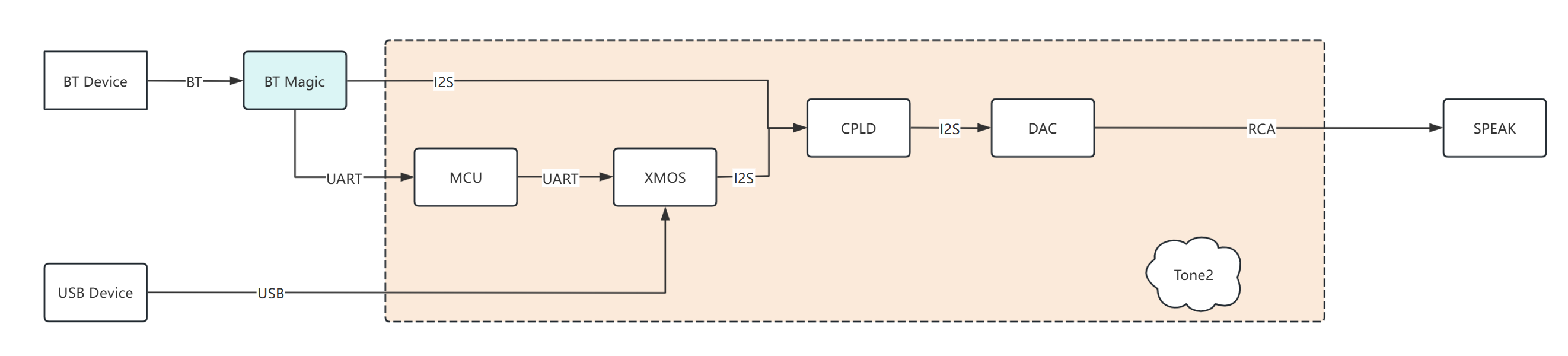
It is not entirely clear what specific control method you require. Could you please indicate in the block diagram below at which point you plan to connect to the device via UART?
BT Magic+Tone2 currently does not support call function. BT Magic does not have a built-in microphone.
Thank you for your detailed question and the in-depth technical discussion! Your idea of integrating steering wheel controls using Arduino and the KCAN interface is excellent – it demonstrates strong hands-on skills and system integration thinking.
If you encounter any other issues during the integration process or have new findings, please feel free to share them with us on the forum. Wishing you the best of luck with your project!
I’ve recently ordered the Tone2 Maker Kit + BT Magic, still waiting for it to arrive. I plan to power the board from a 12V → 5V linear regulator (LT1963A) via the standard USB-C port on the board, while using the USB-C I2S interface for BT Magic as intended.
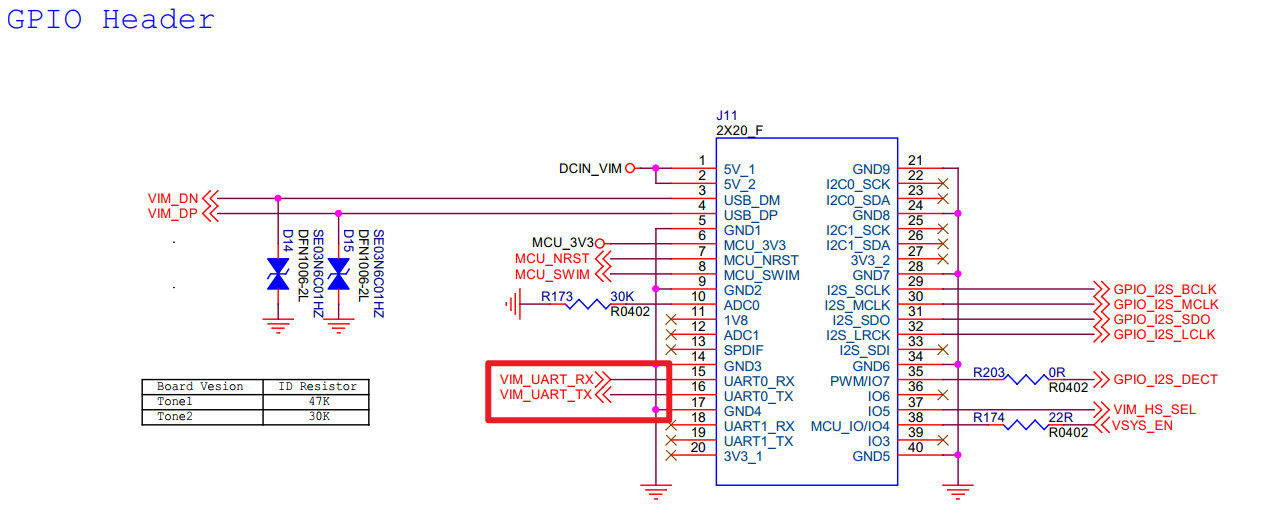
The 40-pin header on the board lists UART TX/RX (pins 15/16).
Can the Arduino be connected to these pins for sending commands, or is this UART reserved for internal use only? If it is reserved, could you indicate where an external MCU/Arduino should connect to send commands?
Are those UART signals 3.3V TTL or 5V? (If 3.3V, I’ll add a level shifter.)
What are the default UART settings? (baud / data bits / parity / stop bits)
Is hardware flow control (RTS/CTS) required or not?
About control: the spreadsheet I found on GitHub shows commands framed as 0x4B <cmd> <data> 0x73. Will that format work directly for play/pause/next/prev/volume when sent over this 40-pin UART, or does the MCU expect additional bytes, checksums, or an ACK/response?
Do you have any example (Arduino or otherwise) showing how to send a valid “next track” or “volume up” command through UART to the board? Even a minimal snippet would clarify the direction of communication and expected behavior.
On the hands-free side, I was just wondering: could an external microphone be connected to the board itself, even though BT Magic doesn’t have a built-in mic? I realize that this would probably require significant firmware changes on BT Magic and possibly modifications to the board, so I’m just curious if it’s theoretically possible.
The UART on the USB-C (I2S) interface is used for communication between the BT Magic and the MCU on the Tone2. If you need to connect via this interface, you must disconnect the UART connection between the BT Magic and the Tone2, as multiple devices cannot be connected in parallel to the same UART.
Additionally, if you are only using the input source from the BT Magic side, you need to pull the EXT_I2S_DECT pin high to 3.3V. Otherwise, volume control commands sent to the Tone2 will not take effect. Current handling method: When BT Magic sends UART data to Tone2, it pulls the EXT_I2S_DECT pin high. After the transmission is complete, it pulls the pin low again to release the data channel to the XMOS.
UART Information:
Logic Level: 3.3V
UART Settings:
Baud Rate: 115200
Parity: NONE
Data Bit: 8
Stop Bit: 1
Flow Control: NONE
During Bluetooth playback, the previous/next track commands need to be sent from the Tone2’s MCU to the BT Magic.
Command: 0x4B 0x32 [0x01/0x02] 0x73
During Bluetooth playback, the play/pause command needs to be sent from the Tone2’s MCU to the BT Magic.
Command: 0x4B 0x20 0x01 0x73
Volume control needs to be sent from the BT Magic to the Tone2’s MCU. The current mechanism involves the BT Magic directly setting the hardware volume on the Tone2, using specific volume values instead of step-by-step adjustments. This method was originally implemented to allow the app to quickly adjust the volume.
To confirm my setup: I’d like to keep the BT Magic fully plugged into the USB-C I2S interface as intended (no disconnecting or modifications there), so it can handle Bluetooth streaming normally to the Tone2. It would be my primary and only audio source.
I would prefer to connect my Arduino to the exposed UART TX/RX pins (15/16) on the Tone2 40-pin header to send playback/volume commands directly to the Tone2’s MCU. My hope is that the Tone2 MCU can then relay the necessary commands (e.g., playback/volume to BT Magic) without me needing to interfere with the inter-module UART bus.
Is the 40-pin header UART available/safe for this external Arduino connection, or is it reserved (e.g., for debug only)? If it’s usable, would the same 0x4B-framed commands (like 0x4B 0x20 0x01 0x73 for play) work when sent to it, with the Tone2 handling forwarding to BT Magic where needed?
Are the UART details you provided (3.3V logic, 115200 baud, 8N1, no flow control) also applicable to this 40-pin header UART, or just to the USB-C I2S one?
Hi @wardaddy ,
as you said, maybe connect to the 40-pin header UART would be the better way.
When we initially designed this switching logic, apart from the UARTport connected to the Bluetooth channel, the other UART port controls were switched together with the audio playback source. For example, the UART port on the 40-pin header is switched along with the I2S on the 40-pin header. This approach is beneficial for the control signals on the playback source side. Your current idea slightly deviates from our original design, but I can modify the CPLD firmware to accommodate your current solution.
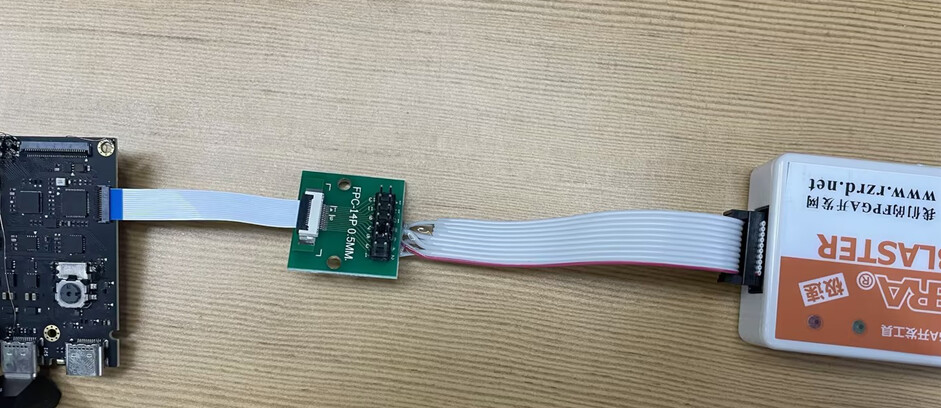
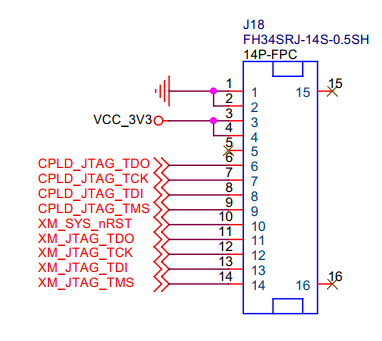
Before doing this, you may want to first familiarize yourself with the CPLD firmware upgrade procedure. The CPLD upgrade process for the Tone2 and Tone2 Pro is similar, with only minor differences in the connection. Tone2 Pro CPLD Firmware Upgrade Guide - Audio - Khadas Community
The UART port on the 40-pin header also uses the same configuration (3.3V logic, 115200 baud rate, 8N1, no flow control), so you can use it with confidence.
Thank you so much for the help and for being willing to modify the CPLD firmware!
I’ve just ordered everything for the Maker Kit:
Waveshare USB Blaster V2
14-pin 0.5 mm FPC cable
14-pin 0.5 mm FPC breakout board
I’ve already studied the CPLD upgrade guide and I’m ready to flash as soon as the parts and the Tone2 maker kit arrive.
Whenever you have a moment, could you please send me the modified CPLD firmware for the Tone2 Maker Kit that allows the 40-pin interface UART (pins 15/16) to always control the board and forward play/pause/next/prev/volume commands to BT Magic.
As soon as I get the file I’ll flash it right away and report back with the results.
This firmware only addresses your current needs and has minimal impact. as follows: When you set it as an I2S input source (BT Magic), UART will switch to the 40-pin header. Normally, it switches to the I2S side(BT Magic).
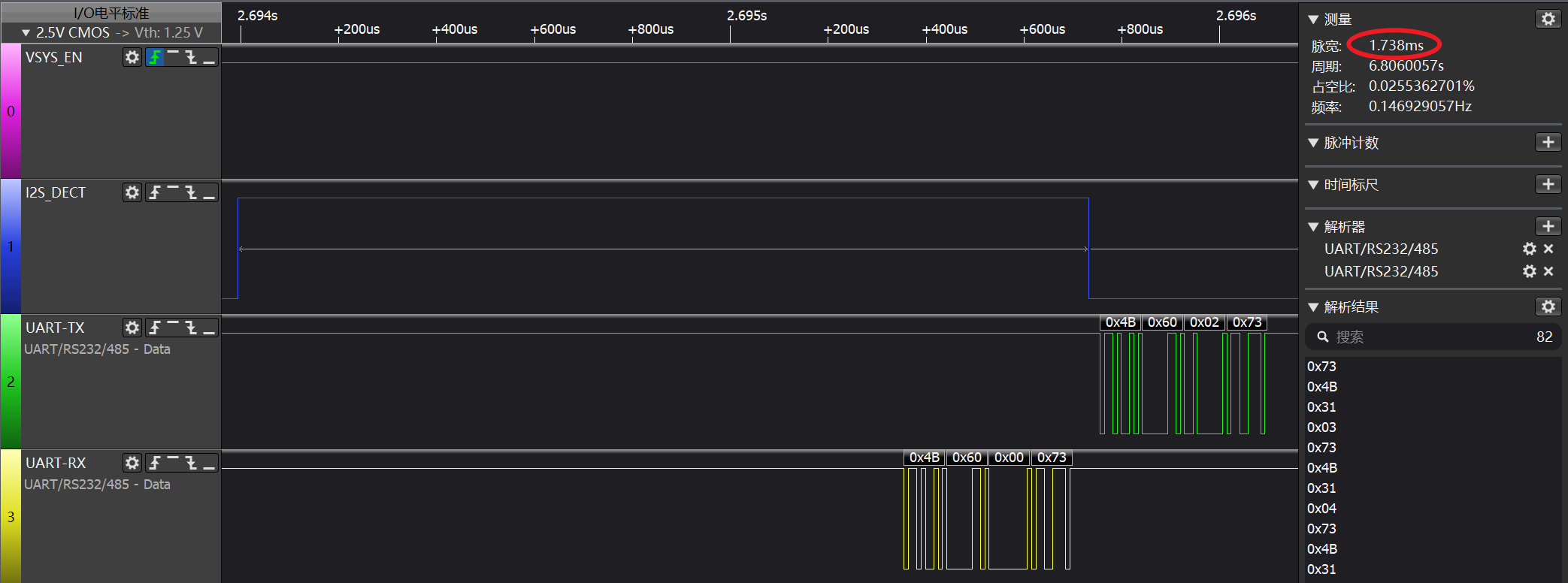
However, BT Magic can also communicate with Tone2 via UART. BT Magic will switch UART to BT Magic’s side by pulling the EXT_I2S_DECT pin high, and will release it immediately after communication, about 1.7ms, this control by BT Magic.
I finally got my hands on the Tone2 Maker Kit, along with a USB-Blaster, FPC adapter, and flat cable, and I’ve flashed the CPLD firmware per instructions. UART commands are working!
Although they only work if I manually select I2S input with the knob. When the board is in Auto mode and BT Magic connects, the UART commands have no effect. It seems the board saves the last selected mode when power is disconnected, so theoretically it should work if I once select manual I2S mode and leave it that way?
Is there any way to make the UART commands work while in Auto mode, or at least accept the input mode command 0x4B 0x34 0x03 0x73 so I can force it to manual I2S programmatically?
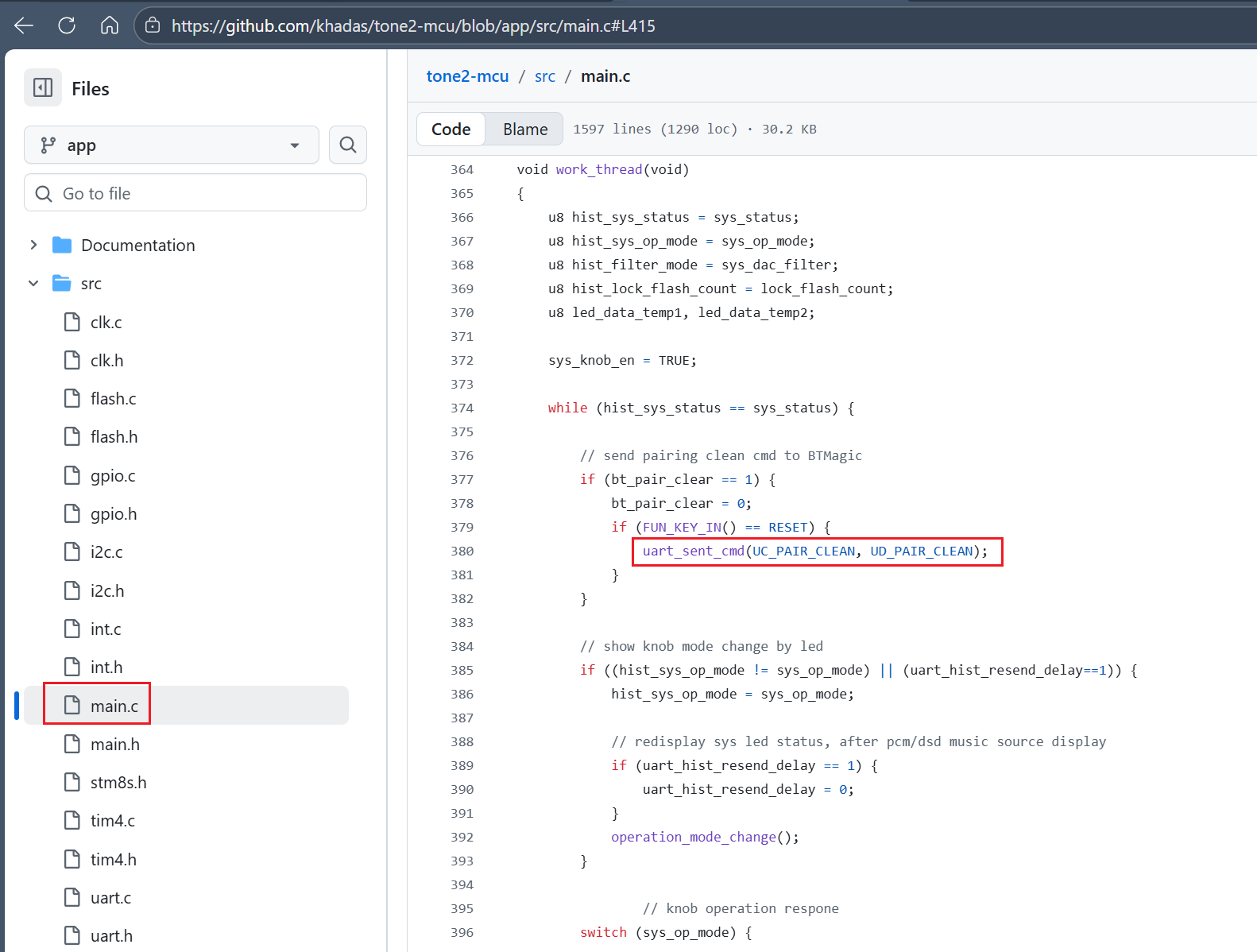
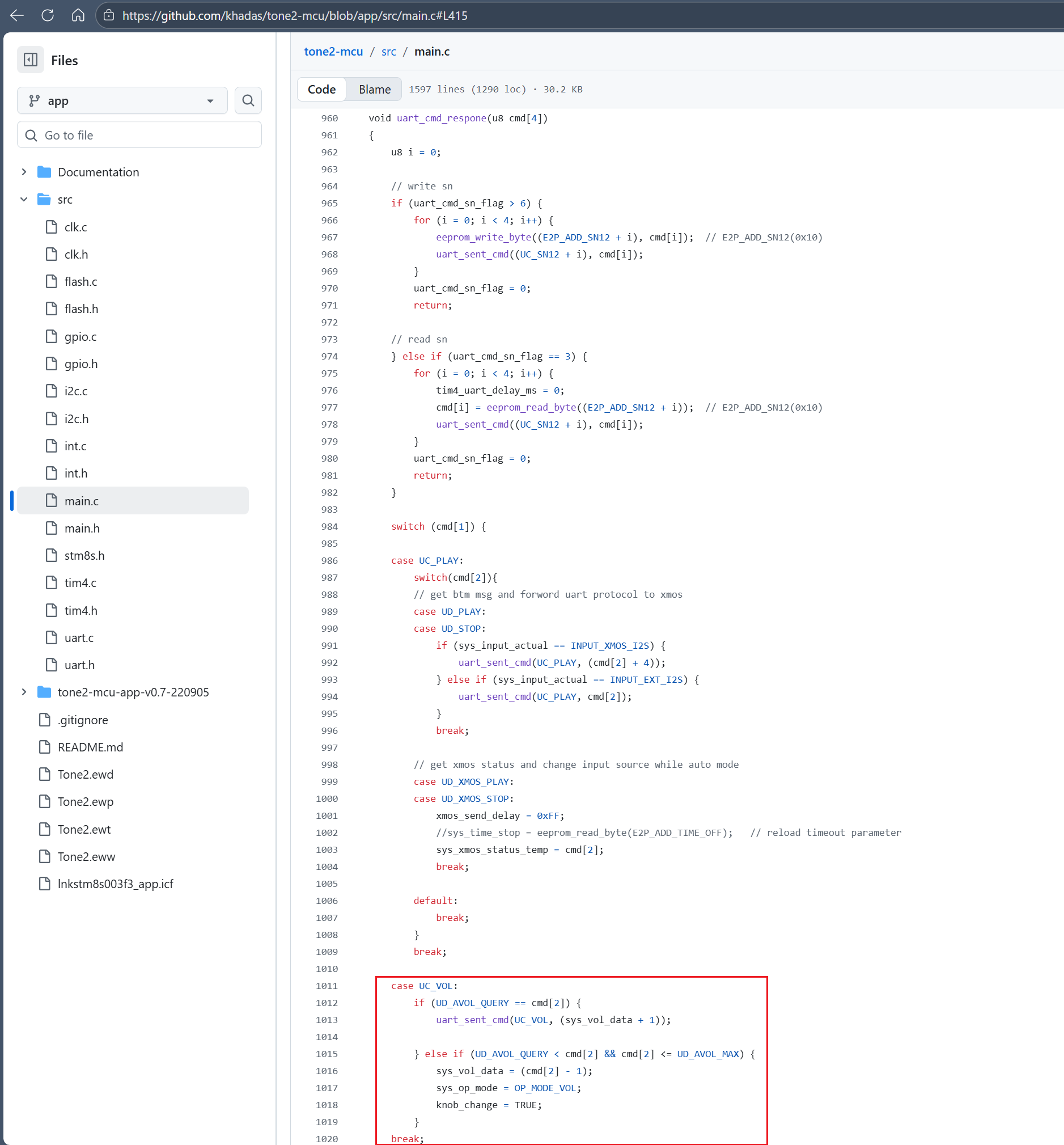
Also, most commands work fine - play/pause, next/prev track, volume check, and setting a specific volume level - but some documented commands don’t seem to work at all (volume up, volume down, BT pairing clear). Looking at the MCU repo, it seems that the UART BT pairing clear command is not implemented in the firmware? Is there any plan or workaround to make volume up/down or BT pairing clear 0x4B 0x64 0x01 0x73 commands functional over UART?
Regarding the 40-pin header UART connection, it must be set to an I2S input source to be effective. There is a way to connect the 40-pin header UART in Auto mode, but UART communication with other input sources will be disconnected. I suggest not changing this part; otherwise, XMOS will not be able to communicate with the MCU via UART with other input sources, such as USB or S/PDIF input channels. This is unless you only use the I2S input source and do not intend to use USB or S/PDIF inputs anymore. Input source settings can be saved even after power-off, once you set it up as an I2S input source, you can achieve your desired effect without making any changes..
The operation to clear pairing records is available here.
You might need to check whether the BT Magic module has been successfully powered on when sending the command to clear the pairing record via UART. It takes a little time for the BT Magic to power on and initialize successfully.