I’m using Mind 2s with Mind Graphics 2. Starting this week, when I connect the monitor to the Mind Graphics 2 HDMI port and power on, the system reboots immediately and keeps rebooting.
It only works when connected to the Mind 2s HDMI port.
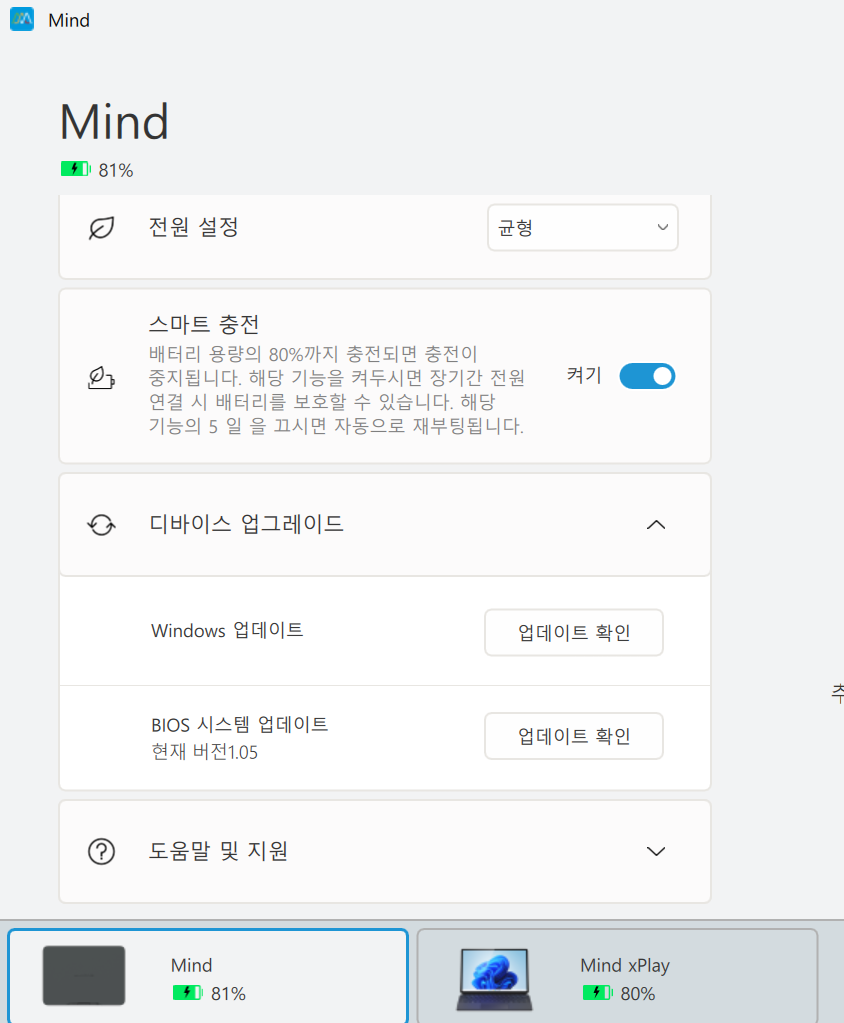
Also, in the Mind App, it shows as Mind x Play instead of Mind Graphics 2.
Provide a complete video of the automatic restart process.
Check which version of the Mind APP is installed.
Determine whether the automatic restart occurs when HDMI is connected to Graphics, whether there was a pop-up prompt before the restart, and open Device Manager to check if any drivers have a yellow exclamation mark.
Attempted recovery:
Uninstall the Mind APP, re-download version 1.60 or above from the DL server, and check whether the automatic restart and Graphics page display in the APP are restored.
Shut down the Mind 2s, remove it from the dock, unplug the Graphics 2 power supply and wait for 2 minutes before reconnecting. Simultaneously reconnect the Mind 2s to Graphics 2, connect HDMI to Graphics 2, and power on. After booting into the system, check whether there are any yellow exclamation marks for drivers in Device Manager, and whether a restart pop-up appears.
The issue has been resolved. Thank you!
The problem was as follows:
The Mind App initially showed “Mind x Play” instead of “Mind Graphics 2” (this bug existed in version 1.60).
Even after uninstalling and reinstalling the App, the issue remained.
Solution that worked:
I followed the recovery method you suggested:
Unplugged the power supply from the Mind Graphics 2.
Waited a few minutes.
Plugged the power back in — then I heard the graphics card up sound.
After that, I connected the Mind 2s. The LED on the Graphics 2 started blinking yellow, then changed to white, and the display came up normally.
Since then, the Mind App correctly recognizes it as Mind Graphics 2.
Thank you very much for your help!