Dear Louis,
Sorry for the late reply. We have factory reset our VIM4 device. However, it seems the firmware version https://dl.khadas.com/products/vim4/firmware/ubuntu/emmc/ubuntu-24.04/vim4-ubuntu-24.04-gnome-linux-5.15-fenix-1.7.4-250423-emmc.img.xz is not working for us. The whole device just blacks out.
So we used back https://dl.khadas.com/products/vim4/firmware/ubuntu/emmc/ubuntu-24.04/vim4-ubuntu-24.04-gnome-linux-5.15-fenix-1.7.3-241129-emmc.img.xz
During this time, we have gone through the hassle of collecting our training dataset, cropping each one by one, for each of these characters:-
"0","1","2","3","4","5","6","7","8","9","a","b","c","d","e","f","g","h","i","j","k","l","m","n","o","p","q","r","s","t","u","v","w","x","y","z","A","B","C","D","E","F","G","H","I","J","K","L","M","N","O","P","Q","R","S","T","U","V","W","X","Y","Z","+","-","÷","/"
We have cropped 2000 images for each individual characters, and trained it using the Paddle OCR model, and has produced our own inference model for both det and rec. We have run it in both Windows and Mac, and it works wonders! We were happy with the training results!
Now, the challenging part is converting both the det and rec model to onnx, then to adla.
For converting to onnx, we have used:-
$ paddle2onnx --model_dir ./det_infer --model_filename inference.pdmodel --params_filename inference.pdiparams --save_file ppocr_det.onnx
$ paddle2onnx --model_dir ./rec_infer --model_filename inference.pdmodel --params_filename inference.pdiparams --save_file ppocr_rec.onnx
As for converting from onnx to adla, the parameters are as follow:-
det
--model-name ppocr_det
--model-type onnx
--model ./ppocr_det.onnx
--inputs "x"
--input-shapes "3,544,960"
--dtypes "float32"
--quantize-dtype int8
--outdir onnx_output
--channel-mean-value "123.675,116.28,103.53,57.375"
--source-file ocr_det_dataset.txt
--iterations 500
--batch-size 1
--kboard VIM4
--inference-input-type "float32"
--inference-output-type "float32"
rec
--model-name ppocr_rec
--model-type onnx
--model ./ppocr_rec.onnx
--inputs "x"
--input-shapes "3,48,320"
--dtypes "float32"
--quantize-dtype int16
--outdir onnx_output
--channel-mean-value "127.5,127.5,127.5,128"
--source-file ocr_rec_dataset.txt
--iterations 500
--batch-size 1
--kboard VIM4
--inference-input-type "float32"
--inference-output-type "float32"
--disable-per-channel False
It has then produced both adla and so files for both det and rec model. And i have moved it to khadas VIM4.
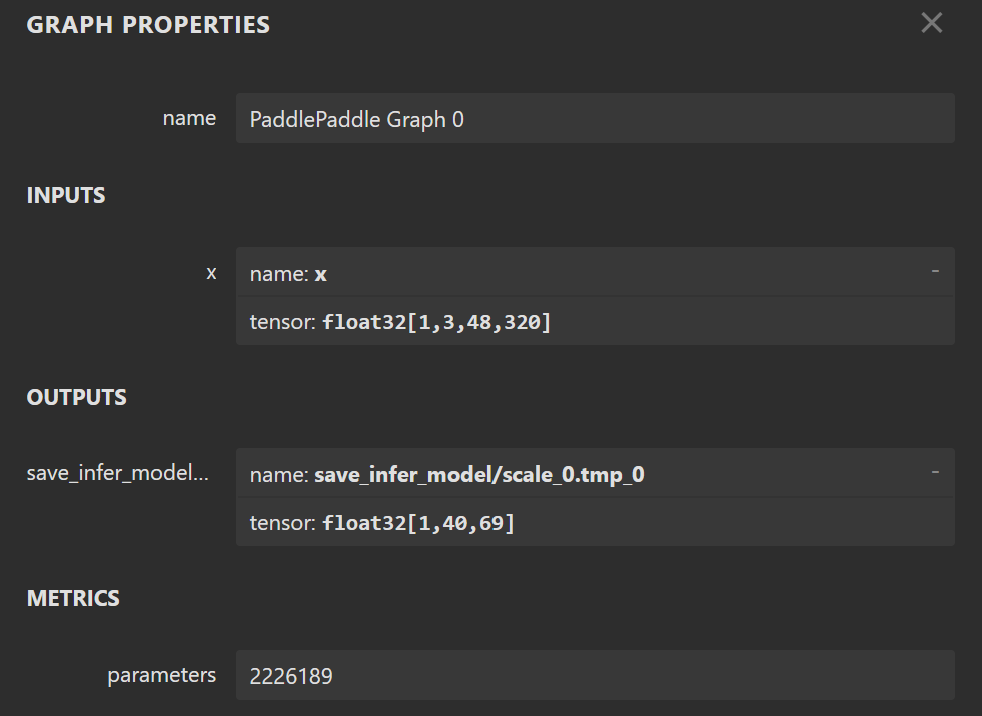
I have changed the code slightly in my python scripts for the color_detection.py and color_utils.py, to get a better recognition for colors. And for the rec_output_size in test.py, i have used (40,69), which i followed your instruction as before, optimizing my rec onnx model and specify the input_shape_dict
python3 -m paddle2onnx.optimize --input_model ppocr_rec.onnx \
--output_model optimized_ppocr_rec.onnx \
--input_shape_dict "{'x': [1,3,48,320]}"
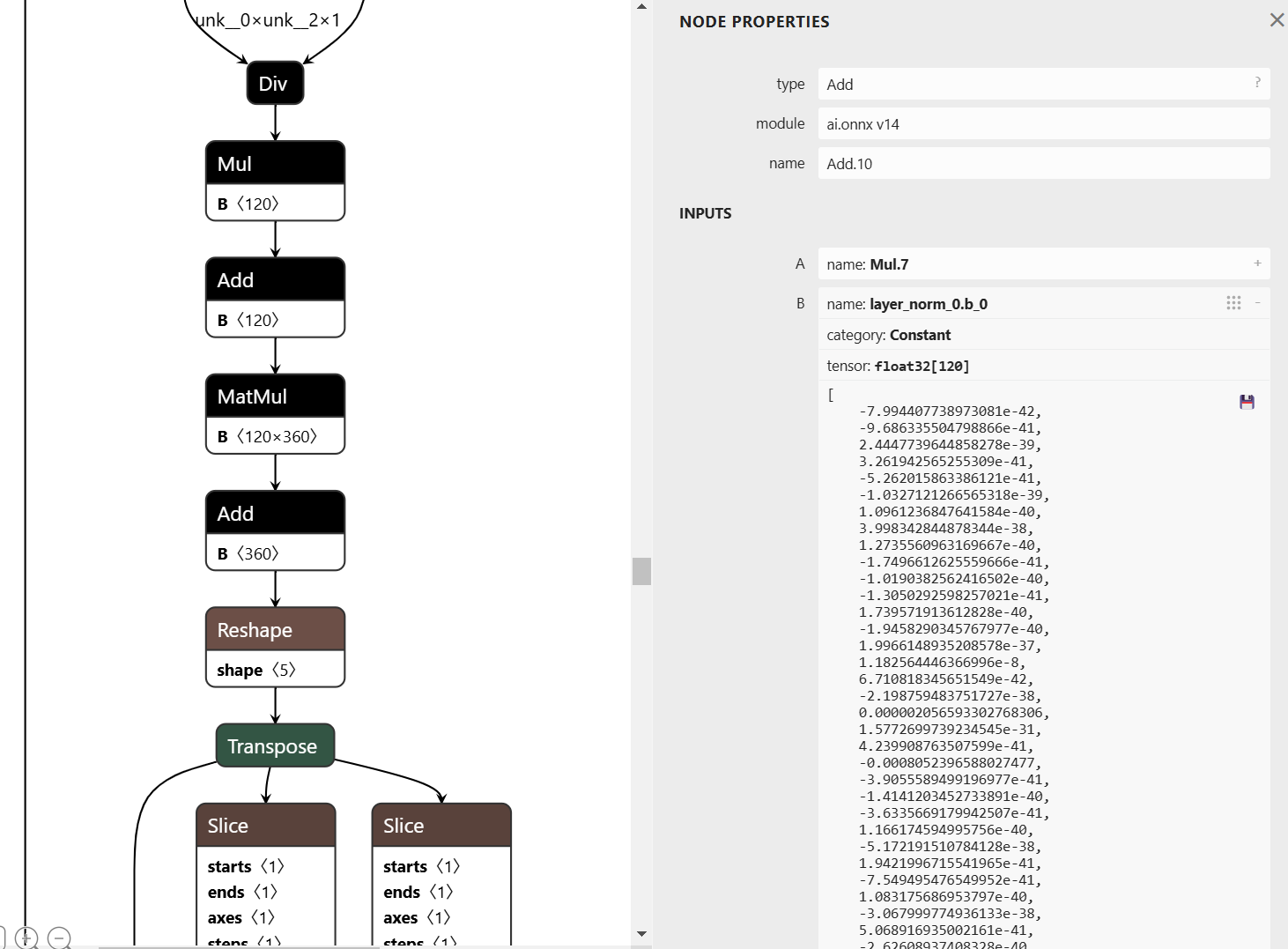
Then i put the optimized_ppocr_rec.onnx to Netron and got this result
Below are the updated python codes.
test.py
import numpy as np
import os
import urllib.request
import argparse
import sys
import math
from ksnn.api import KSNN
from ksnn.types import *
import cv2 as cv
import time
from postprocess import ocr_det_postprocess, ocr_rec_postprocess
from PIL import Image, ImageDraw, ImageFont
#from write_result_to_db import writeResultToDb
import color_detection
det_mean = [123.675, 116.28, 103.53]
det_var = [255 * 0.229, 255 * 0.224, 255 * 0.225]
rec_mean = 127.5
rec_var = 128
det_input_size = (544, 960) # (model height, model width)
rec_input_size = ( 48, 320) # (model height, model width)
# rec_output_size = (40, 6625)
# rec_output_size = (40, 97)
# rec_output_size = (40, 6)
rec_output_size = (40, 69)
font = ImageFont.truetype("./data/simfang.ttf", 100)
texts_data = ["0","1","2","3","4","5","6","7","8","9","a","b","c","d","e","f","g","h","i","j","k","l","m","n","o","p","q","r","s","t","u","v","w","x","y","z",
"A","B","C","D","E","F","G","H","I","J","K","L","M","N","O","P","Q","R","S","T","U","V","W","X","Y","Z","+","-","÷","/"
]
def draw(image, boxes):
draw_img = Image.fromarray(image)
draw = ImageDraw.Draw(draw_img)
for box in boxes:
x1, y1, x2, y2, score, text = box
left = max(0, np.floor(x1 + 0.5).astype(int))
top = max(0, np.floor(y1 + 0.5).astype(int))
right = min(image.shape[1], np.floor(x2 + 0.5).astype(int))
bottom = min(image.shape[0], np.floor(y2 + 0.5).astype(int))
color = (0,0,0)
alphabet_image = image[int(left):int(right),int(top):int(bottom)]
color_result = "N/A"
if np.sum(alphabet_image) != 0:
result,result_mask,largest_pixel_count = color_detection.detect(alphabet_image)
if not result_mask is None:
color_result = result
if result == "red":
color = (0,0,255)
elif result == "yellow":
color = (0,255,255)
elif result == "blue":
color = (255,0,0)
elif result == "green":
color = (0,255,0)
draw.rectangle((left, top, right, bottom), outline=color, width=10)
draw.text((left, top - 20), f"{text}, {color_result}", font=font, fill=color)
return draw_img, np.array(draw_img)
if __name__ == '__main__':
ppocr_det = KSNN('VIM4')
ppocr_rec = KSNN('VIM4')
print(' |---+ KSNN Version: {} +---| '.format(ppocr_det.get_nn_version()))
print('Start init neural network ...')
ppocr_det.nn_init(library="./model/libnn_ppocr_det.so", model="./model/ppocr_det_int8.adla", level=0)
ppocr_rec.nn_init(library="./model/libnn_ppocr_rec.so", model="./model/ppocr_rec_int16.adla", level=0)
print('Done.')
    # usb camera
    # cap = cv.VideoCapture(int(0))
    # mipi
    pipeline = "v4l2src device=/dev/media0 io-mode=dmabuf ! queue ! video/x-raw,format=YUY2,framerate=30/1 ! queue ! videoconvert ! appsink"
    cap = cv.VideoCapture(pipeline, cv.CAP_GSTREAMER)
    print(cap.isOpened())
cap.set(3,1920)
cap.set(4,1080)
frame_counter = 0;
# camera_id = "XzWz75mg6ZKB3S28QedR"
while(1):
frame_counter += 1
ret,orig_img = cap.read()
start = time.time()
det_img = cv.resize(orig_img, (det_input_size[1], det_input_size[0])).astype(np.float32)
det_img[:, :, 0] = (det_img[:, :, 0] - det_mean[0]) / det_var[0]
det_img[:, :, 1] = (det_img[:, :, 1] - det_mean[1]) / det_var[1]
det_img[:, :, 2] = (det_img[:, :, 2] - det_mean[2]) / det_var[2]
det_output = ppocr_det.nn_inference(det_img, input_shape=(det_input_size[0], det_input_size[1], 3), input_type="RAW", output_shape=[(det_input_size[0], det_input_size[1], 1)], output_type="FLOAT")
det_results = ocr_det_postprocess(det_output[0], orig_img, det_input_size)
final_results = []
for i in range(len(det_results)):
xmin, ymin, xmax, ymax, _, _ = det_results[i]
rec_img = orig_img[ymin:ymax, xmin:xmax]
new_height = rec_input_size[0]
new_width = int(new_height / rec_img.shape[0] * rec_img.shape[1])
if new_width > rec_input_size[1] * 1.2:
# text too long. If you want to detect it, please convert rec model input longer.
continue
elif new_width < rec_input_size[1] * 1.2 and new_width > rec_input_size[1]:
new_width = rec_input_size[1]
rec_img = cv.resize(rec_img, (new_width, new_height)).astype(np.float32)
padding_img = np.zeros((rec_input_size[0], rec_input_size[1], 3)).astype(np.float32)
padding_img[:, :new_width] = rec_img
padding_img = (padding_img - rec_mean) / rec_var
rec_output = ppocr_rec.nn_inference(padding_img, input_shape=(rec_input_size[0], rec_input_size[1], 3), input_type="RAW", output_shape=[(rec_output_size[0], rec_output_size[1])], output_type="FLOAT")
det_results[i][5] = ocr_rec_postprocess(rec_output[0])
print('results')
print(det_results[i])
probability = det_results[i][4]
print(f'det_results {det_results}')
text = det_results[i][5]
print(f'probability: {probability}')
print(f'text: {text}')
print(f'text length: {len(text)}')
final_results.append(det_results[i])
if len(text) == 1 and probability > 0.5 and text in texts_data:
final_results.append(det_results[i])
if det_results is not None:
pil_img, cv_img = draw(orig_img, final_results)
cv_img = cv.resize(cv_img, (1280, 720))
end = time.time()
print('Done. inference time: ', end - start)
cv.imshow("capture", cv_img)
if cv.waitKey(1) & 0xFF == ord('q'):
break
ppocr_det.nn_destory_network()
ppocr_rec.nn_destory_network()
cap.release()
cv.destroyAllWindows()
color_detection.py
# Python code for Multiple Color Detection
import numpy as np
import cv2
import color_utils
# Capturing video through webcam
webcam = cv2.VideoCapture(0)
# Start a while loop
def detect(image_frame):
# Convert the imageFrame in
# BGR(RGB color space) to
# HSV(hue-saturation-value)
# color space
THRESHOLD = 0.1
height, width, channel = image_frame.shape
hsv_frame = cv2.cvtColor(image_frame, cv2.COLOR_BGR2HSV)
b, g, r = cv2.split(image_frame)
# Set range for red color and
# define mask
lower_red_low = color_utils.lower_red_low
upper_red_low = color_utils.upper_red_low
lower_red_high = color_utils.lower_red_high
upper_red_high = color_utils.upper_red_high
red_mask_low = cv2.inRange(hsv_frame, lower_red_low, upper_red_low)
red_mask_high = cv2.inRange(hsv_frame, lower_red_high, upper_red_high)
red_mask = cv2.bitwise_or(red_mask_low, red_mask_high)
# red_mask = color_utils.is_red(r,g,b)
# Set range for blue color and
# define mask
blue_lower = color_utils.lower_blue
blue_upper = color_utils.upper_blue
blue_mask = cv2.inRange(hsv_frame, blue_lower, blue_upper)
# blue_mask = color_utils.is_blue(r,g,b)
# Set range for green color and
# define mask
green_lower = color_utils.lower_green
green_upper = color_utils.upper_green
green_mask = cv2.inRange(hsv_frame, green_lower, green_upper)
# green_mask = color_utils.is_green(r,g,b)
# Set range for yellow color and
# define mask
yellow_lower = color_utils.lower_yellow
yellow_upper = color_utils.upper_yellow
yellow_mask = cv2.inRange(hsv_frame, yellow_lower, yellow_upper)
# yellow_mask = color_utils.is_yellow(r,g,b)
# red_pixels = np.where(red_mask[red_mask==255])
# yellow_pixels = np.where(yellow_mask[yellow_mask == 255])
# blue_pixels = np.where(blue_mask[blue_mask == 255])
# green_pixels = np.where(green_mask[red_mask == 255])
# w,h,c = hsv_frame.shape
total_pixel_count = width * height
# red_pixel_count = red_pixels[0].array().len()
# yellow_pixel_count = yellow_pixels[0].array().len()
# blue_pixel_count = blue_pixels[0].array().len()
# green_pixel_count = green_pixels[0].array().len()
pixel_counts = {
'red': np.sum(red_mask),
'yellow': np.sum(yellow_mask),
'green': np.sum(green_mask),
'blue': np.sum(blue_mask)
}
# red_pixel_count = np.sum(red_mask)
# yellow_pixel_count = np.sum(yellow_mask)
# green_pixel_count = np.sum(green_mask)
# blue_pixel_count = np.sum(blue_mask)
result = None
result_mask = None
largest_pixel_count = 0
pixel_percentage = 0
# red_percentage = pixel_counts['red'] / total_pixel_count
# yellow_percentage = pixel_counts['yellow'] / total_pixel_count
# green_percentage = pixel_counts['green'] / total_pixel_count
# blue_percentage = pixel_counts['blue'] / total_pixel_count
for color, count in pixel_counts.items():
percentage = count / total_pixel_count if total_pixel_count > 0 else 0
if percentage > THRESHOLD and count > largest_pixel_count:
pixel_percentage = percentage
largest_pixel_count = count
result = color
if result is 'red':
result_mask = red_mask
elif result is 'blue':
result_mask = blue_mask
elif result is 'green':
result_mask = green_mask
elif result is 'yellow':
result_mask = yellow_mask
# if largest_pixel_count < pixel_counts['red'] : # Adjust threshold as needed
# largest_pixel_count = pixel_counts['red']
# pixel_percentage = pixel_counts['red'] / total_pixel_count
# result_mask = red_mask
# result = "red"
# if largest_pixel_count < pixel_counts['blue']:
# largest_pixel_count = pixel_counts['blue']
# pixel_percentage = pixel_counts['blue'] / total_pixel_count
# result_mask = blue_mask
# result = "blue"
# if largest_pixel_count < pixel_counts['green']:
# largest_pixel_count = pixel_counts['green']
# pixel_percentage = pixel_counts['green'] / total_pixel_count
# result_mask = green_mask
# result = "green"
# if largest_pixel_count < pixel_counts['yellow']:
# largest_pixel_count = pixel_counts['yellow']
# pixel_percentage = pixel_counts['yellow'] / total_pixel_count
# result_mask = yellow_mask
# result = "yellow"
# if red_pixel_count > largest_pixel_count:
# largest_pixel_count = red_pixel_count
# result_mask = red_mask
# result = "red"
#
# if yellow_pixel_count > largest_pixel_count:
# largest_pixel_count = yellow_pixel_count
# result_mask = yellow_mask
# result = "yellow"
#
# if blue_pixel_count > largest_pixel_count:
# largest_pixel_count = blue_pixel_count
# result_mask = blue_mask
# result = "blue"
#
# if green_pixel_count > largest_pixel_count:
# largest_pixel_count = green_pixel_count
# result_mask = green_mask
# result = "green"
# color_counts = {"red": 0, "yellow": 0, "green": 0, "blue": 0}
# red_count = 0
# yellow_count = 0
# green_count = 0
# blue_count = 0
# percentage_on_mask = largest_pixel_count / total_pixel_count
print(f"Pixel counts: {pixel_counts}")
print(f"Pre Result: {result}")
print(f"Pixel Percentage: {pixel_percentage}")
print(f"Largest Pixel Count: {largest_pixel_count}")
print(f"Total Pixel Count: {total_pixel_count}")
# print(f"Percentage on mask {percentage_on_mask}")
# for y in range(height):
# for x in range(width):
# # Get the RGB value of the current pixel
# b, g, r = image_frame[y, x] # OpenCV reads as BGR by default
#
# rgb_pixel = (r, g, b)
#
# if color_utils.is_red(rgb_pixel):
# color_counts["red"] += 1
# elif color_utils.is_yellow(rgb_pixel):
# color_counts["yellow"] += 1
# elif color_utils.is_green(rgb_pixel):
# color_counts["green"] += 1
# elif color_utils.is_blue(rgb_pixel):
# color_counts["blue"] += 1
# Determine the dominant color based on pixel counts
# if total_pixel_count > 0:
# red_percentage = color_counts["red"] / total_pixel_count
# yellow_percentage = color_counts["yellow"] / total_pixel_count
# green_percentage = color_counts["green"] / total_pixel_count
# blue_percentage = color_counts["blue"] / total_pixel_count
#
# if red_percentage > THRESHOLD: # Adjust threshold as needed
# largest_pixel_count = color_counts["red"]
# result_mask = red_mask
# result = "red"
# elif yellow_percentage > THRESHOLD:
# largest_pixel_count = color_counts["yellow"]
# result_mask = yellow_mask
# result = "yellow"
# elif green_percentage > THRESHOLD:
# largest_pixel_count = color_counts["green"]
# result_mask = green_mask
# result = "green"
# elif blue_percentage > THRESHOLD:
# largest_pixel_count = color_counts["blue"]
# result_mask = blue_mask
# result = "blue"
# print(f"Red Percentage: {red_percentage}")
# print(f"Yellow Percentage: {yellow_percentage}")
# print(f"Green Percentage {green_percentage}")
# print(f"Blue Percentage {blue_percentage}")
# print(color_counts)
if pixel_percentage < THRESHOLD:
largest_pixel_count = 0
result_mask = None
result = None
return [result, result_mask, largest_pixel_count]
color_utils.py
import numpy as np
lower_red_low = np.array([0, 100, 100], np.uint8)
upper_red_low = np.array([5, 255, 255], np.uint8)
lower_red_high = np.array([160, 100, 100], np.uint8)
upper_red_high = np.array([179, 255, 255], np.uint8)
lower_blue = np.array([100, 70, 30], np.uint8)
upper_blue = np.array([130, 255, 255], np.uint8)
lower_green = np.array([50, 50, 30], np.uint8)
upper_green = np.array([90, 255, 255], np.uint8)
lower_yellow = np.array([10, 150, 80], np.uint8)
upper_yellow = np.array([40, 255, 255], np.uint8)
postprocess.py
import cv2
import numpy as np
from shapely.geometry import Polygon
import pyclipper
det_box_thresh = 0.2
min_size = 5
unclip_ratio = 1.5
character_str = ["blank"]
#with open("./data/symbol.txt", "rb") as fin:
with open("./data/en_dict_custom.txt", "rb") as fin:
lines = fin.readlines()
for line in lines:
line = line.decode("utf-8").strip("\n").strip("\r\n")
character_str.append(line)
character_str.append(" ")
ignored_token = [0]
def ocr_det_postprocess(det_output, original_image, det_input_size):
outs = cv2.findContours((det_output * 255).astype(np.uint8), cv2.RETR_LIST, cv2.CHAIN_APPROX_SIMPLE)
if len(outs) == 3:
contours = outs[1]
elif len(outs) == 2:
contours = outs[0]
det_results = []
for i in range(len(contours)):
bounding_box = cv2.boundingRect(contours[i])
if bounding_box[2] < min_size or bounding_box[3] < min_size:
continue
mask = np.ones((bounding_box[3], bounding_box[2]), dtype=np.uint8)
tmp_det_output = det_output.reshape(det_input_size[0], det_input_size[1])
score = cv2.mean(tmp_det_output[bounding_box[1]:bounding_box[1] + bounding_box[3], bounding_box[0]:bounding_box[0] + bounding_box[2]], mask)[0]
if score < det_box_thresh:
continue
box = np.array(((bounding_box[0], bounding_box[1]),
(bounding_box[0] + bounding_box[2], bounding_box[1]),
(bounding_box[0] + bounding_box[2], bounding_box[1] + bounding_box[3]),
(bounding_box[0], bounding_box[1] + bounding_box[3])))
poly = Polygon(box)
distance = poly.area * unclip_ratio / poly.length
offset = pyclipper.PyclipperOffset()
offset.AddPath(box, pyclipper.JT_ROUND, pyclipper.ET_CLOSEDPOLYGON)
expanded = offset.Execute(distance)
tmp_box = np.array(expanded)
xmin = max(int(np.min(tmp_box[0, :, 0]) / det_input_size[1] * original_image.shape[1]), 0)
ymin = max(int(np.min(tmp_box[0, :, 1]) / det_input_size[0] * original_image.shape[0]), 0)
xmax = min(int(np.max(tmp_box[0, :, 0]) / det_input_size[1] * original_image.shape[1] + 1), original_image.shape[1])
ymax = min(int(np.max(tmp_box[0, :, 1]) / det_input_size[0] * original_image.shape[0] + 1), original_image.shape[0])
det_results.append([xmin, ymin, xmax, ymax, score, 0])
return det_results
def ocr_rec_postprocess(rec_output):
rec_idx = rec_output.argmax(axis=1)
rec_prob = rec_output.max(axis=1)
selection = np.ones(len(rec_idx), dtype=bool)
selection[1:] = rec_idx[1:] != rec_idx[:-1]
selection &= rec_idx != ignored_token
#print(f'rec_idx: {rec_idx}')
#print(f'selection: {selection}')
#print(f'rec_output: {rec_output}')
#print(f'character_str: {character_str}')
char_list = [character_str[text_id] for text_id in rec_idx[selection]]
character_result = "".join(char_list)
return character_result
Finally, i downloaded your env and run it
$ mkdir myenv
$ tar -xzf myenv.tar.gz -C myenv
$ source myenv/bin/activate
$ cd ppocr_test
$ python test.py
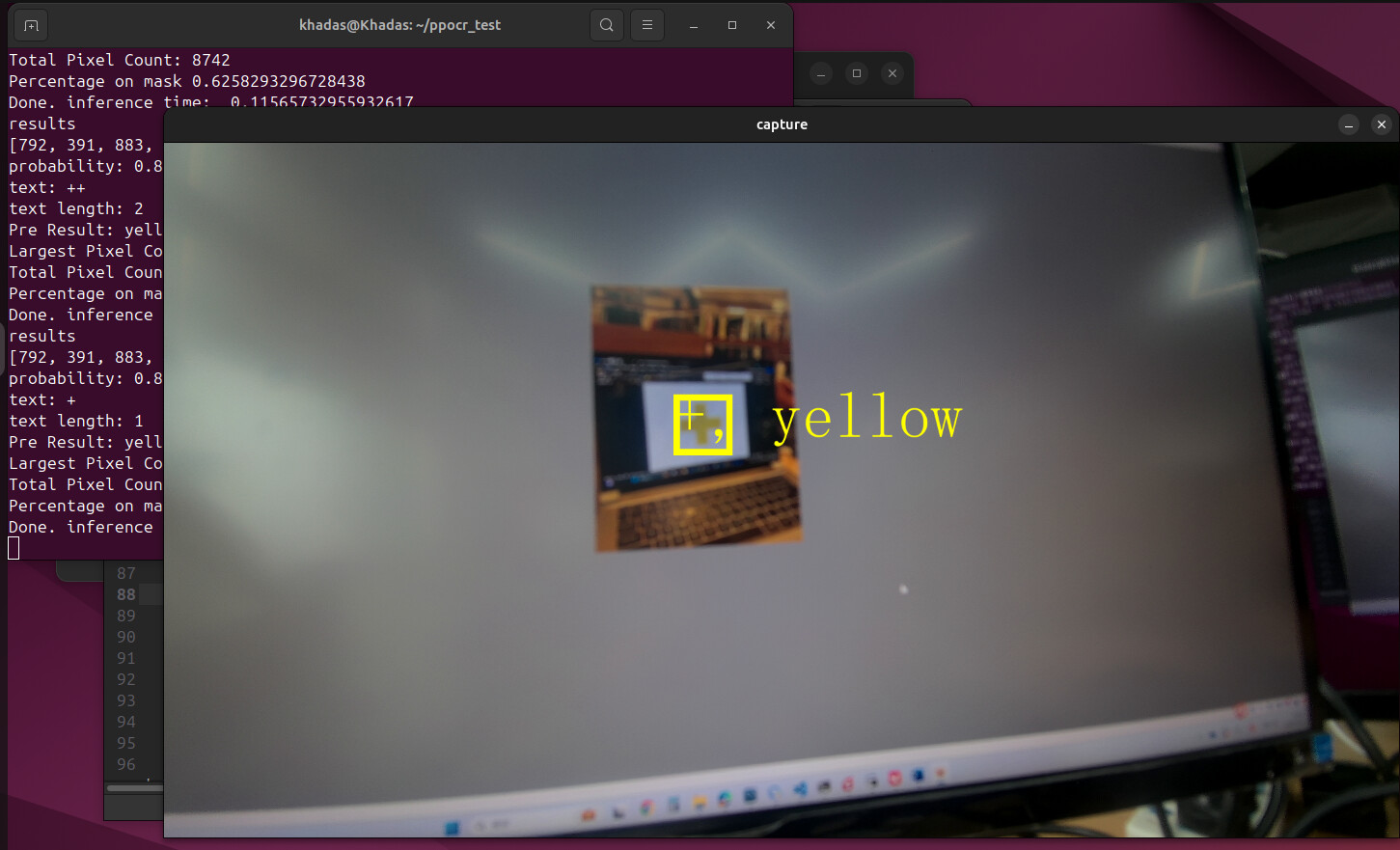
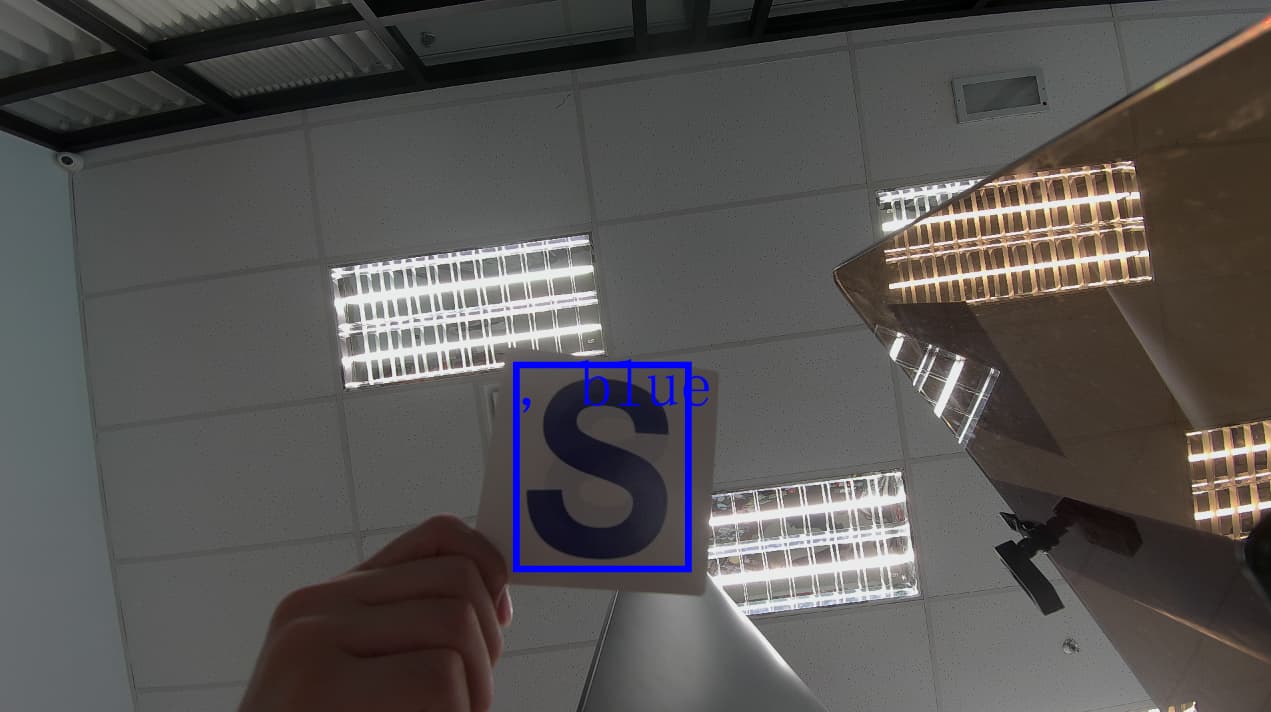
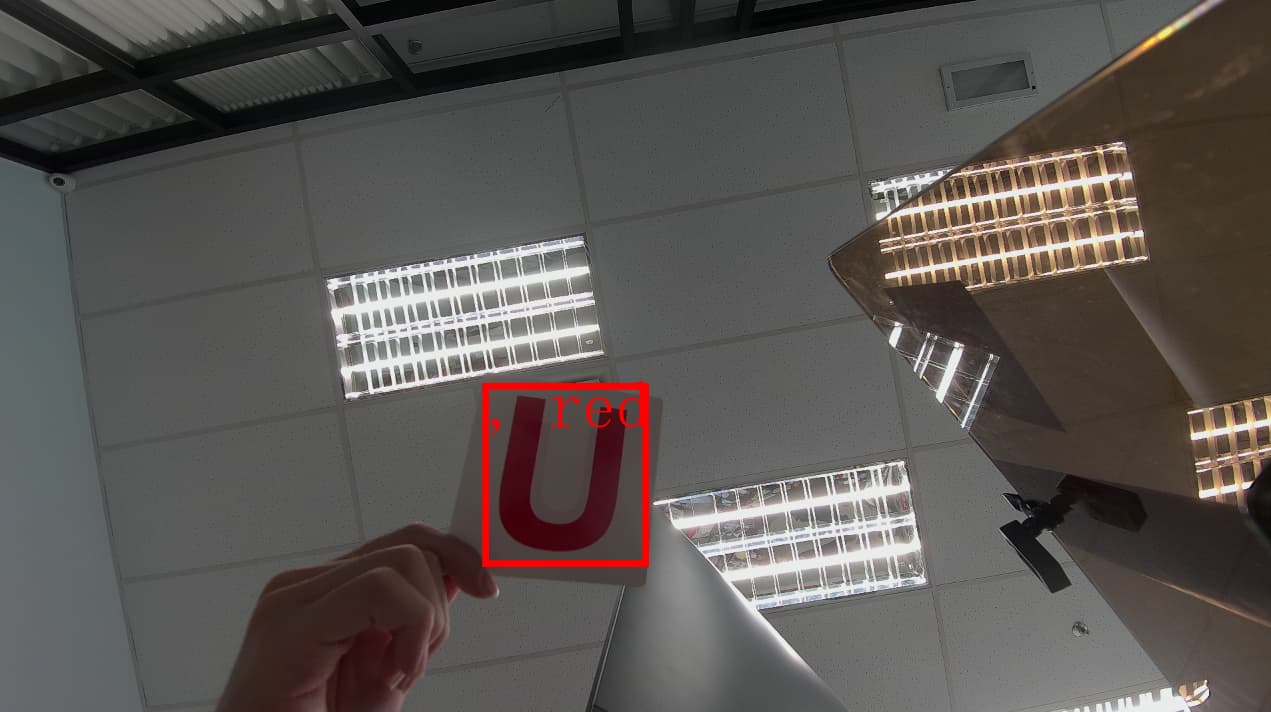
Below are the screenshots
The is the dict im using for referencing to the characters
en_dict_custom.txt (196 Bytes)
It seems like the detection is working, but the recognition is not. I’m not sure where went wrong, is it the rec_output_size issue? Or is it somewhere during the conversion went wrong?
I will send you the email for our ppocr det and rec model, our converted onnx model and the converted so and adla model to you via email louis.liu@wesion.com