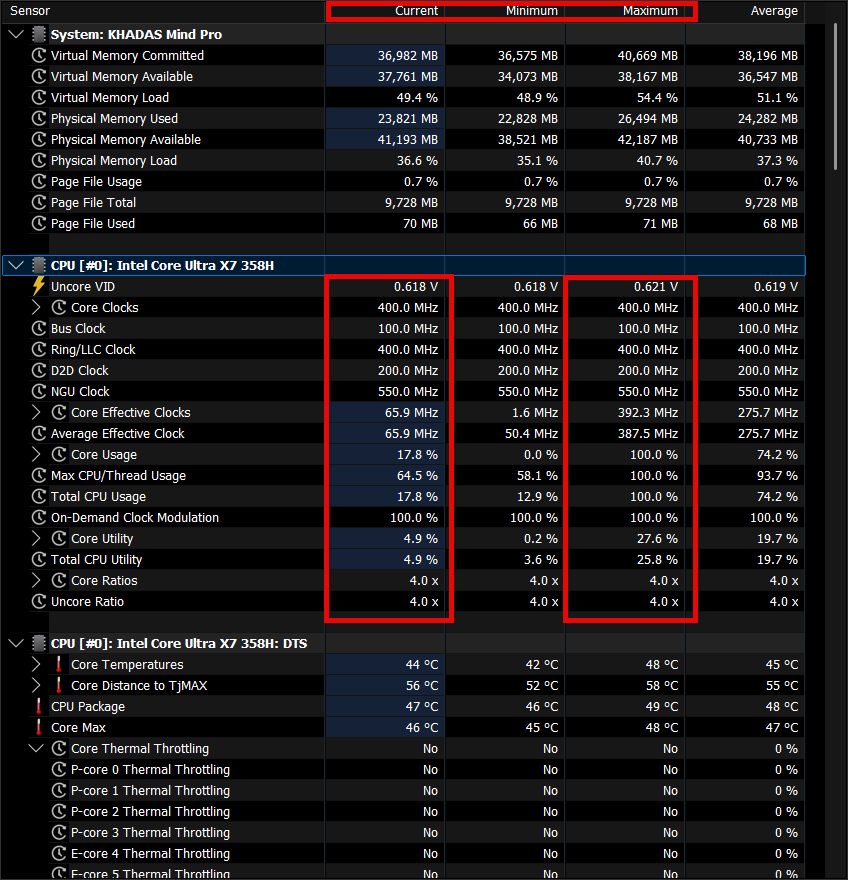
I have the Mind Pro and the XPlay. Mind Pro running Windows 11 Pro (OS build 26200.8875) and is at BIOS version 1.01. XPlay running firmware 1.00. Product model A1021.
The problem I continuously face is when putting my machine to “sleep mode” or “hibernate”, upon booting from those states, the Mind Pro gets into what I call “limp mode” and the max core speed is 400 MHz verified by HWiNFO64 “Core Clocks” set to 400 MHz and “Core Effective Clocks” never able to go above 400 MHz. I have to shutdown my computer, disconnect the Mind Pro from XPlay, disconnect the power cable and press and hold the power button on the XPlay for 10 seconds then reconnect everything and boot again to reset.
According to the Windows Mind software application for XPlay, there is a firmware update to 1.01 but every time I try to update, the update fails.
Can this “limp mode” issue be fixed and how do I update XPlay so it doesn’t fail every time?
**Update #1: I was continuously working and all sudden everything slowed down to a crawl. I’m locked at 400 MHz without having put system to sleep or hibernation. Windows Power Plan is at “High Performance”.