I bought my Mind 2 and Mind Graphics back in September 2024. They’ve been working totally fine until today.
I’m now getting a message ‘Graphics Card Driver Missing’ as below.
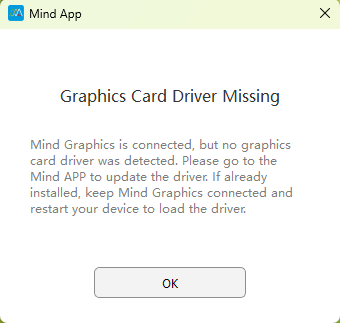
The full message reads: ‘Mind Graphics is connected, but no graphics card driver was detected. Please go to the Mind APP to update the driver. If already installed, keep Mind Graphics connected and restart your device to load the driver.’
I’ve rebooted several times and get the same message every time.
I’m running Mind app v1.6 and check regularly that I’m on the latest BIOS (for the Mind) and latest firmware (for the Mind Graphics).
When I open the Mind App, a popup tells me that ‘Restart Required - The graphics card failed to load properly. Please restart the device to try again’ as below. So I can’t show you the BIOS and firmware versions etc. I have to use Task Manager to close the Mind App so I can carry on troubleshooting.
** Image removed as I’m a new user
The RTX graphics card was showing fine in Device Manager. It’s no longer showing up as per the below
** Image removed as I’m a new user
I’ve downloaded and attempted to run 555.99-desktop-win10-win11-64bit-international-dch-whql from the support page at dl.khadas.com - Index of /products/mind-graphics/drivers/ . The Nvidia software fails to find any Nvidia hardware as below.
** Image removed as I’m a new user
** Image removed as I’m a new user
As a slight aside, I’ve never managed to get the Mind Graphics speakers to work. They show up find in Device Manager and Window Settings. I’ve set them to the default sound device, they’re allowed / enabled for apps and Windows to use the device, but when I click the Sound device Test button nothing happens. Right from the start I’ve had to use an external speaker. I meant to log this previously!
** Image removed as I’m a new user
** Image removed as I’m a new user
** Image removed as I’m a new user
Please can you advise on next steps? The missing graphics card is the top priority, I can cope without the Mind speakers and carry on using the external speaker for now.
Look forward to hearing from you